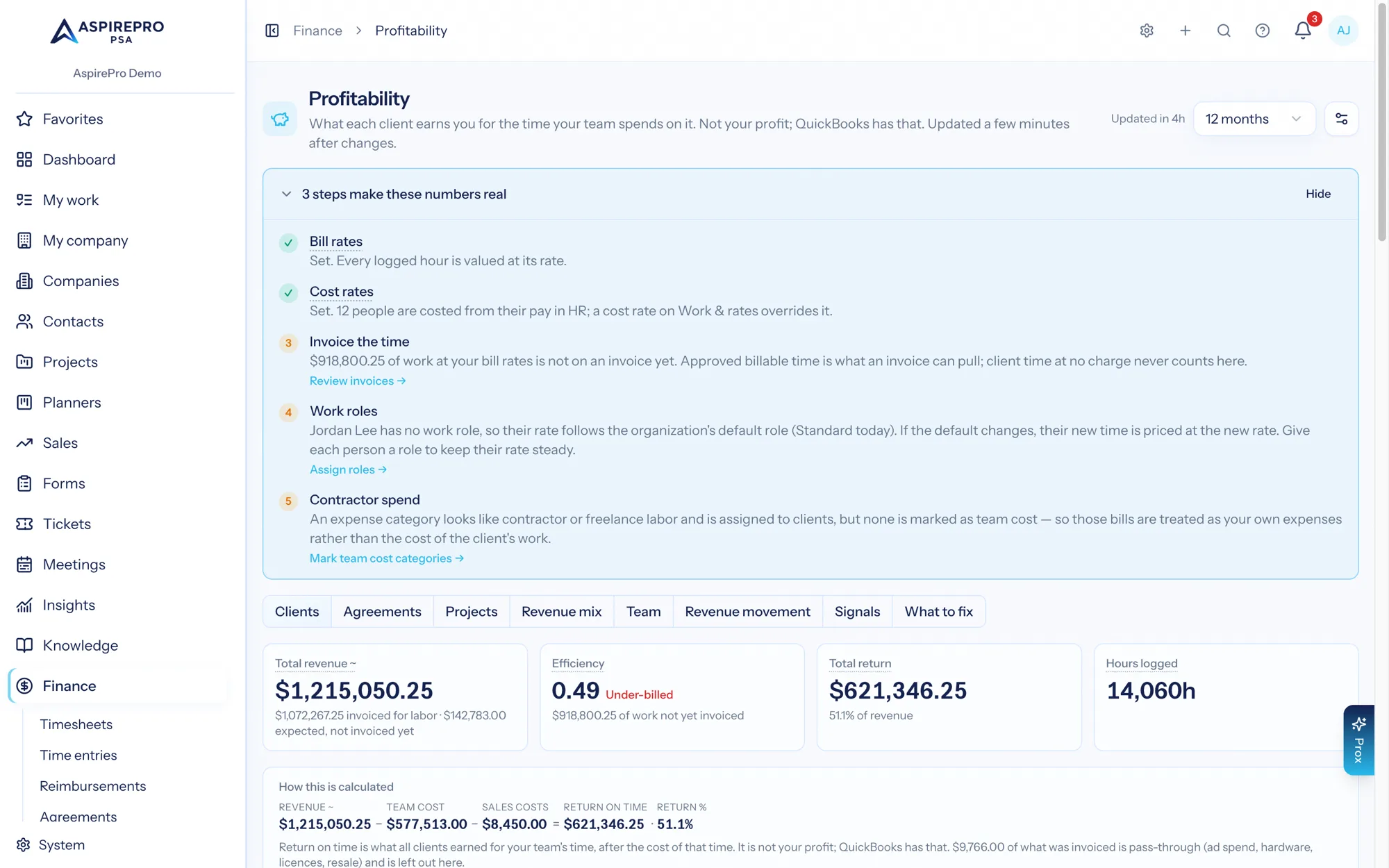
Finance → Profitability subtracts only cost it actually recorded. There is no allocation, no spreading and no modelled overhead inside a return figure. This page is every rule that decides what lands on a client and what does not.
The three sources#
The first always counts. The other two count only when Include client expenses in return on time is on (see below).
- Logged time × cost rates — recorded. Hours logged against a client's work, priced at the cost rate recorded on each time entry. This is Team cost.
- Client expenses — recorded. Any non-voided expense line assigned to a Customer, dated inside the month. Two things create them: an approved reimbursement item marked billable and linked to a client, and spend in QuickBooks assigned to that customer. The first needs no integration at all.
- Payment-processing fees — recorded. The fee on a card payment against one of the client's invoices, taken from the settlement record. It is captured once, at settlement, and never also booked as an expense line. It counts as a client expense.
That third source is the reason a client's Client expenses column, when the switch is on, can be non-zero on a organization with QuickBooks not connected and no reimbursements: taking a card payment costs money, and that cost belongs to the client whose invoice was paid.
What is never in a client's cost: rent, software subscriptions, payroll taxes, general admin, marketing, and any spend in QuickBooks nobody assigned to a customer. That is overhead, it belongs to the business rather than to a client, and Statements is where it is accounted for. The What to fix tab reports expenses not assigned to a client as a number so you can see how much is sitting outside every client's return.
Contractor bills made from a pay run aren't counted a second time. When pay runs create a bill for a contractor in QuickBooks, that bill is skipped when AspirePro brings in your QuickBooks spending. What the contractor is paid is already recorded through their pay rules, so counting the bill as well would charge the client twice.
Which time counts#
A time entry reaches a client's team cost when all of these hold:
- It is not rejected. Rejected time is time a reviewer said was wrong, and it counts for nothing — no hours, no cost, no billable value.
- It resolves to a client. Either the entry carries an agreement (the agreement's company wins) or its target does: a ticket carries its company, a project carries its company, and a task resolves through its container — a project task carries its project's company — and a client meeting (a company activity) carries its company. A planner task, a work category and an orphaned task carry no client, and none is ever guessed onto one. Time logged as a kind of work set to Internal (such as Sales) is internal too, even on a company: a sales call doesn't make a prospect a client with a cost and no revenue. Deleting the ticket, project, task or meeting later doesn't change this: its time keeps its client.
- Its duration is above zero.
Open and submitted time counts. Profitability does not wait for approval. A return figure that only appeared after Friday's approval run would be permanently a week stale, so time counts from the moment it is logged. The "What's behind these numbers" panel says how many hours in the period are still waiting for timesheet approval, so you can see exactly how much a return figure could still move — and Timesheets scopes its own "approval is the hard gate" rule to billing, which is what it has always meant.
Time that reaches no client is counted as internal, not dropped. The panel names it: "Another N hours were logged on internal work and are not counted against any client." If your team logs most of its time against planner tasks, that sentence is the explanation for a team cost that looks impossibly low.
Client expenses are off unless you switch them on#
Include client expenses in return on time (in the Profitability settings, off by default) decides whether purchases made for a client count against that client. Off, return on time is revenue minus the cost of your team's time, and nothing about expenses appears anywhere in Profitability: no column, no term in "How this is calculated", no row in "What's behind these numbers", no expense cards on What to fix. That is the right setting for a consulting firm or an agency whose expenses are its own. On, a QuickBooks expense assigned to a Customer, a billable reimbursement linked to a client, and card-processing fees come off that client's return. The switch applies the moment you flip it, past months included; nothing needs rebuilding.
Pay from agreements#
What a person earns from an agreement (a share of the fee, a fixed amount a month, a one-off; see Pay rules) counts by its kind of pay. Team pay is part of Team cost. A commission or referral fee is a sales cost, taken off Return after team cost. An owner distribution is shown but is never a cost. Hourly pay is different: it is the cost rate on the person's time entries, so it counts when the time is logged. Amounts per person show only to people who may see pay.
When team pay counts. By default a share counts in the month the work and the fee it's for happen, so months compare fairly. Once your organization pays people through pay runs, the Profitability settings offer Count team pay from agreements:
- When it's earned (recommended). As above.
- When it's paid. It counts in the month a pay run paid it, by pay date. Months before you started pay runs always count when earned, and their later payment isn't counted again, so each month's pay counts once. If what was paid for one of those earlier months differs from what it earned, Profitability keeps the earned figure. A recovery (money paid back) counts as a negative amount in the month it's paid.
The setting applies the moment you change it, past months included; nothing needs rebuilding. If pay runs are switched off later, team pay counts when it's earned until they're back on. The signals always use earned amounts, so they don't jump on paydays, and so does Earned per hour. While pay runs are on, the Agreements and Team tabs show each row's pay earned in the period beside what pay runs have paid for it so far.
Hours, exactly#
hours = duration_minutes ÷ 60- Deducted minutes — a break or an interruption taken off a timed entry when it is saved. The stored duration is already net of it, so a 9:00–17:00 entry with a one-hour lunch stores 7 hours, and every surface — hours logged, billable hours, team cost, invoices, retainer usage, payroll — reads those 7 hours. Nothing subtracts the break a second time.
- Which month — an entry lands in the month its start time falls in. An entry started at 23:40 on 30 June is June, however long it ran.
- Rounding. Finance settings has a time rounding rule that rounds an entry's duration to the nearest N minutes when it is created. Profitability reads that stored, already-rounded duration — the same figure invoicing reads — so the hours on an invoice and the hours on this page agree.
Rates are snapshots, not lookups#
Every time entry stores the cost rate and the bill rate that were resolved when it was saved. Profitability reads those stored values.
The consequence is deliberate and worth knowing: changing a cost rate today does not restate history. Give someone a raise and next month's return reflects it; last quarter's stays exactly as it was reported, so a closed month cannot move under a decision made after it. It also means setting a cost rate for the first time does not cost the hours already logged on its own. To fill them, use Apply current rates on System → Work & rates: it appears when time logged this month or last carries no rate, and puts today's rates on those entries — only where the rate is empty, never changing one that's set, and never giving invoiced time a new bill rate — then rebuilds those two months of Profitability straight away. Older hours stay without a cost rate.
How a cost rate is resolved#
When an entry is saved, its cost rate resolves in this order:
- An hourly pay rule for that person on the entry's project or agreement — say Sam is paid $85/h for time on the Northwind retainer. See Pay rules and who's paid.
- Otherwise, the person's own effective-dated personal cost rate on Work & rates, if one is set.
- Otherwise, their pay in HR, turned into a loaded hourly cost: a contractor's pay as-is, an employee's pay plus employer payroll tax, benefits and other costs, divided by working hours. See Cost to the business.
- Otherwise, the work role's cost rate.
- Otherwise, nothing — the entry is saved with no cost rate and its hours become hours with no cost rate.
HR pay sits above the role on purpose: a role's cost rate is an average across everyone in the role, while HR pay is that person. The entry remembers which of these priced it, and the Team cost row of What's behind these numbers says how many hours were costed from HR pay. There is no team default and no organization default for cost. The team/organization chain resolves which work role a person inherits when they have none of their own; it does not supply a cost rate. Bill rates are a different, longer chain — a per-person rate, then a role × type matrix cell or a role rate with a work-type multiplier.
Hourly pay rules are set on the agreement's or project's Who's paid. Cost rates are set on work roles (and, per person, as rate overrides) under System → Work & rates, or come from each person's pay in HR. They are guarded by their own permission because they are compensation-adjacent. Setting a cost rate on every work role is the single highest-value thing most organizations can do for these numbers — without it, team cost is always zero and every Return % is hidden.
Worked example — one time entry, end to end#
Dana Okoye starts a timer on a Rivera ticket and stops it 150 minutes later, deducting 30 minutes for an interruption. Her user rate carries a $65.00 cost rate; her role and work type resolve a $150.00 bill rate. The entry is billable.
stored minutes  150 − 30                  = 120
hours           120 ÷ 60                  = 2.0 h
team cost       2.0 h × $65.00            = $130.00
billable value  2.0 h × $150.00           = $300.00
The $130.00 is subtracted from Rivera's return. The $300.00 is not revenue — it is work in progress, and it becomes expected revenue only if the month closes with no invoice covering the agreement it sits under. See Counting revenue.
Worked example — hours with no cost rate#
Rivera Group, June 2026, with client expenses switched on: 121.5 hours logged, of which Priya Shah's 18.0 hours carry no cost rate.
recorded team cost        62.0 h × $65.00 + 41.5 h × $58.00 = $6,437.00
hours with no cost rate   18.0 h
return                    $9,900.00 − $6,437.00 − $594.30   = $2,868.70   (29.0%)
Had Priya's hours carried the shop's $60.00 cost rate, the picture would be:
team cost         $6,437.00 + 18.0 h × $60.00 = $7,517.00
return            $9,900.00 − $7,517.00 − $594.30 = $1,788.70   (18.1%)
So those 18 hours are worth $1,080.00 of hidden cost and 10.9 points of return on one client in one month. The "What's behind these numbers" panel puts it in words — "121.5 hours were logged, but 18.0 of them have no cost rate on file, so the return reads higher than it really is" — the Team tab flags Priya with an amber badge, and the What to fix tab's Hours with no cost rate card counts them across every client.
Worked example — a card payment's fee#
INV-1042 for $6,000.00 is issued to Rivera on 5 June and paid by card on 9 June. The processor takes 2.9% plus $0.30.
fee $6,000.00 × 2.9% + $0.30 = $174.30With the switch on, that $174.30 lands as a client expense on Rivera, in June — the month the payment settled, not the month the invoice was issued. It also reaches the agreement, because the payment's invoice carries an agreement. Combined with the $420.00 stock-photo licence assigned to Rivera in QuickBooks, Rivera's June client expenses are $594.30.
If the same invoice had been paid by bank transfer, the fee would be $0.00 and Rivera's client expenses would be $420.00.
Worked example — a billable reimbursement#
A designer buys a $180.00 font licence for the Rivera rebuild and claims it as a billable expense linked to Rivera. Once a reviewer approves the item, it becomes a real expense record with a line assigned to Rivera, dated the day it was spent.
- With the switch on, it counts as $180.00 of Rivera's client expenses in that month, whether or not QuickBooks is connected.
- If it is also passed through onto an invoice, that invoice's total is revenue in its own issue month — cost and recovery are two separate events, and the page shows both.
The fastest route from "No costs recorded" to a real return figure is: set cost rates on your work roles, then, if you count client expenses, make sure billable client purchases are marked billable and linked to the client. Everything on this page follows from those two habits.