Finance → Profitability → What to fix is the tab that tells you why your numbers are what they are. Return on time is only as good as the records behind it, so rather than quietly degrading, the module names every gap it can see and links to the worklist that closes it.
A card turns green with a tick at zero, amber with a count above zero, and muted with a dash when the answer is genuinely unknown rather than clean — a distinction that matters, because a green zero on a number nobody counted would be the worst kind of reassurance. Every card except the last carries a link to the list that fixes it, and the link only shows while there is something to fix.
The setup card#
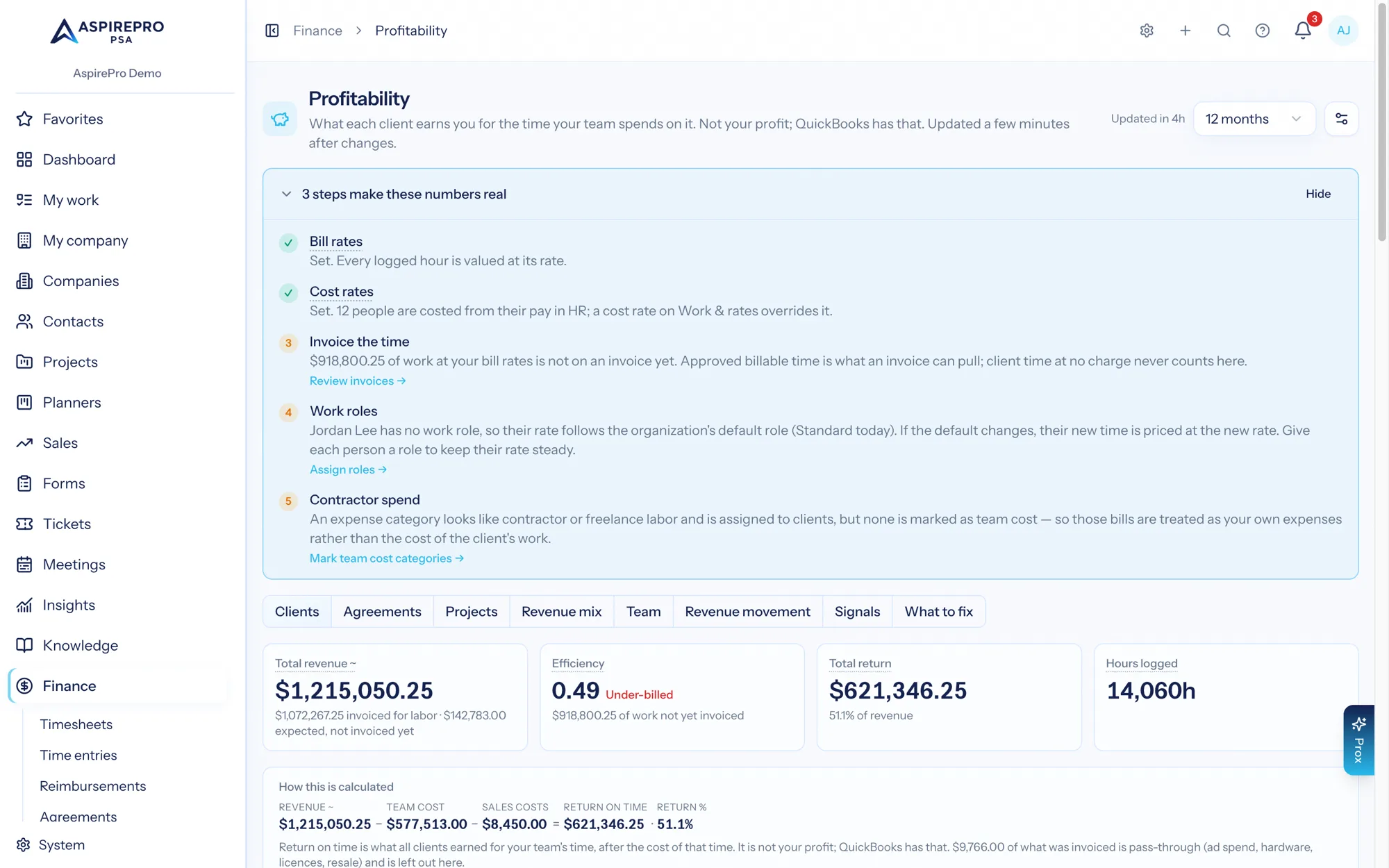
Above the tabs, while anything is missing, one card reads "N steps make these numbers real" and lists them in your own figures. It is gone once nothing is left, and Hide puts it away for you until the set of gaps changes.
- Bill rates — done when a work role has one. If hours in the period carry no rate (they were logged before one existed), it says how many and points to Apply rates under Work & Rates.
- Cost rates — done when a role or a person has one, when anyone has pay recorded in HR (it becomes their cost rate, and the step says how many people are costed that way), or when one assumed team rate is set (in which case it says Return is estimated until real rates replace it). Until then Return reads Team cost not set.
- Invoice the time — done when every hour of logged work is invoiced; otherwise names the value of the work not on an invoice yet, per client, so one over-billed client cannot hide another's unbilled hours. Client time at no charge (a kind of work set to no charge, or time someone logged as not billable) is never counted here; it still counts in Efficiency's work at bill rates.
- Contractor spend — raised only when an expense category whose name looks like contractor or freelance labor is assigned to clients while none is marked Team cost on Finance → Reimbursements → Categories.
Every link follows your permissions: people who may change rates get Set cost rates →; everyone else reads "Ask an administrator to set cost rates."
The cards#
There are ten cards with Include client expenses in return on time on and eight with it off. In screen order:
- Team time not accounted for
- Hours with no cost rate
- Invoices without agreement
- Expenses with no category — only with the client-expenses switch on
- Companies not matched in QuickBooks
- Agreements without dates
- Expenses not assigned to a client — only with the client-expenses switch on
- Tickets with no client — hidden when Service Desk is off
- Tickets still open — hidden when Service Desk is off
- Work not linked to a client
Two more worklists appear only when they have something in them:
- Product lines with no cost — product sales whose invoice line has no cost. They're left out of Return until a cost is set: open the invoice and set the line's cost (it stays internal; the client never sees it). See Revenue mix.
- Bills that may be a payout already counted — bills tagged to a client whose payouts already count as team cost. If a bill is a payout's payment, pick the payout it pays so the money counts once; if it isn't, mark it Not a payout. Decided bills stay listed under Already decided, and a matched bill that changed in QuickBooks since is flagged to check again.
Team time not accounted for#
The first card. It reads "Xh of Yh": X is paid time nobody logged, Y is the team's paid time in the period. Paid time comes from work schedules, minus holidays and approved time off. The card explains itself in one sentence: "Your team had about Yh of paid time in this period (work schedules, minus holidays and approved time off). Ah were logged: Ch on clients and Ih on internal work. The rest is time no return figure knows about. Team cost reads lower than reality by roughly that much." Why it distorts: hours nobody logged cost nothing in any return figure, so every return reads better than it is by about that much. It reads — with "Nobody on the team has a work schedule or default hours yet, so paid time cannot be counted." Fix: log the missing time. Links to Open timesheets.
Hours with no cost rate#
Logged hours in the period with no cost rate on the time entry. Why it distorts: those hours are real client work that adds nothing to any return figure, so every return figure they touch reads better than it is. It is also the single most common reason a Return % cell reads No costs recorded. Fix: set cost rates on work roles under System → Work & rates, or add a per-person rate override. Remember rates are stored on each entry as it is saved, so this fixes the future; for time logged this month and last, Apply current rates on Work & rates fills in the empty ones. Links to Open timesheets.
Invoices without agreement#
Issued (non-void, non-draft) invoices in the period with no agreement: neither the invoice nor any of its lines is on an agreement. An each-line invoice with even one line on an agreement isn't counted here. Why it distorts: their revenue counts for the client but not for any agreement, so agreement return understates and the client's revenue looks like it came from nowhere. Fix: choose the agreement it bills in the invoice's Agreement field (it works on invoices from QuickBooks, Xero and Stripe too), or, on an invoice with an agreement per line, an agreement on the line. An invoice that really isn't for an agreement, like a one-off project, can stay without one. Links to Open invoices.
Expenses with no category#
Shown only while Include client expenses in return on time is on. Expenses from QuickBooks in the period with no category set. Why it distorts: an expense with no category is usually one with no customer too, and reporting on cost by category has a hole in it. Fix: categorise them. Links to Open expenses.
Companies not matched in QuickBooks#
Companies set up for QuickBooks sync but not matched to a customer there. Not limited to the period — it is a configuration count. Why it distorts: with no match, expenses assigned to that customer in QuickBooks cannot find their way to the company here, and its invoices cannot be linked. Fix: match the company to its QuickBooks customer on the company's Finance tab. Links to Open companies.
Agreements without dates#
Agreements with no start date. Not limited to the period. Why it distorts: without a start month, a quarterly, semi-annual or annual agreement has nothing to count its billing occurrences from, so it can only ever expect a monthly amount — and Revenue Movement cannot tell when it began. Fix: set the start date. Links to Open agreements.
Expenses not assigned to a client#
Shown only while Include client expenses in return on time is on. Spend in QuickBooks in the period with no customer on it. Why it distorts: it does not, and that is the point of the card. Unassigned spend is overhead, it belongs to no client, and it is never split across clients by guesswork. The card exists so you can see how much of your spend is sitting outside every client's return, and assign the part that genuinely belongs to a client. Fix: assign client-specific expenses to their Customer in QuickBooks; they count on the next sync. Links to Open expenses.
Tickets with no client#
Tickets that belong to no company at all. Not limited to the period, so the count and the list it links to describe the same set. Hidden entirely when Service Desk is off. Why it distorts: their work counts in your team's total but against no client, holding down every client's Share of work and every work vs revenue gap. Fix: set the company on each. Links to Fix these tickets, the ticket list filtered to no company.
Tickets still open#
Every open ticket. Not limited to the period. Hidden when Service Desk is off. Why it distorts: work counts in the month a ticket closes, so every open ticket has contributed nothing to any client's share yet. A shop that leaves tickets open makes its team look less busy than it is. Fix: close what is done. Links to Open tickets.
Work not linked to a client#
Work items finished in the period that belong to no client — planner tasks always, plus tickets, tasks and meetings with no company set. The card reads "N of the M work items finished in this period are not linked to any client". It reads — with "Work has not been counted for this period yet, so this is unknown rather than zero." when the period was built before work was counted. It is the one card with no link. Why it distorts: it stays in the work total, so a client's 8% means 8% of everything your team finished. When this number is large, every client's share and every work vs revenue gap is held down by roughly that much, and the Signals tab warns you above 25%. Fix: for tickets and tasks, attach a client. Planner work has no client by design and is meant to be here.
The "What's behind these numbers" panel#
Every Profitability view — the tabs, each client's page, and the client PDF — carries a collapsible "What's behind these numbers" panel. Its header summarises the rows as N recorded · N partly recorded · N estimated · N not available; opening it gives one row per ingredient with a badge, one sentence of what it actually found in your period, and a To fix: line where there is one.
On the tabs the panel describes the whole organization. On a client's page and in its PDF, every row is scoped to that client.
The badges:
- Recorded — from records. Nothing is being assumed.
- Partly recorded — recorded, but with a named slice missing. It says the slice.
- Estimated — from an assumption or a proxy. Never promoted to Recorded by having more of it.
- Not available — not recorded at all. Not zero.
The rows#
- Revenue — Recorded when every dollar in the figure came from an issued invoice (before sales tax, drafts and voids left out), or when the setting is Invoices only; Partly recorded when invoices cover some of it and the rest is what live agreements were expected to bill, or billable time not yet invoiced, in months no invoice covered — it names both amounts; Estimated when nothing was invoiced in the period and the whole figure is expectation or uninvoiced time. That last state is the one a brand-new organization sees: the team has logged billable hours, no invoice exists yet, and the row says so rather than calling the figure recorded. Its To fix line reads "Invoice the logged time, or count invoices only under the gear on the page header."
- Bill rates — the rates the work was priced at, and the answer to "where does $60 come from". Recorded lists every active role's bill rate ("Senior $200/h · Standard $150/h · Junior $100/h"), says that every hour is valued at the rate on its entry when it was logged, that a personal or negotiated rate outranks the role rate, and that changing a rate prices time from then on. Partly recorded when hours were logged but carry no rate. Not available when no role has a bill rate at all. Its Change rates → link opens Work & Rates for people who may; everyone else reads "Ask an administrator to change rates."
- Team cost — Recorded when every logged hour carries a cost rate; Partly recorded when some do not, naming the hours; Not available when no client time is logged at all. Two notes ride this row: how many hours are still waiting for timesheet approval (Profitability counts time from the moment it is logged), and how many hours were logged on internal work — planner tasks, work categories and meetings that belong to no client and are therefore in no client's return.
- Client expenses — present only while Include client expenses in return on time is on. Recorded when expenses are assigned to clients and QuickBooks is connected; Partly recorded when they exist without it, because approved billable reimbursements create those lines on their own and purchases made any other way are not counted yet; Not available when nothing is assigned to a client at all.
- Cost completeness — the loudest row, and the explanation for the hidden percentage. Not available when revenue carries no recorded cost anywhere; Partly recorded when it does but hours carry no cost rate, or when expenses are recorded but no time is logged; Recorded when every logged hour is priced. With Include client expenses in return on time on and QuickBooks connected, it also adds a sentence of context: "Separately, $X of spend in QuickBooks is not assigned to any customer. That is overhead and stays out of client return. Finance → Statements shows the whole business." That is overhead, kept out of every client's return on purpose, so it never marks an otherwise complete setup as incomplete. With the switch off, the row never mentions expenses: its Not available wording becomes "No time with a cost rate has been logged against $X of revenue…" and its To fix line names only cost rates.
- Work counted — Recorded when logged hours measure effort directly; Estimated when only item counts are available (an exact count, but only an estimate of effort); Not available when the period has no counted work items or nothing was finished. It reports the split: how many items reached clients, companies that paid nothing, and nobody.
- Estimated team cost — present only when a team cost rate is set, and always Estimated. It states the assumptions in words, the hours and dollars they produce, and says the estimate is shown in its own column and never changes the recorded Return. Its To fix line reads "Logging time against the work replaces the estimate with the real cost." When there is nothing to price, the row instead reads "Nothing to estimate in this period: every finished work item already has logged time, or nothing was finished." and has no To fix line.
Worked example — the same organization, twice#
Day one. A new organization, June 2026. Everyone logs time but no work role has a cost rate. QuickBooks is not connected. Invoices are paid by bank transfer, so there are no card fees. Client expenses are switched on. Client revenue for the month is $320,000.00.
revenue          $320,000.00
team cost                $0.00     (2,860 hours logged, none with a cost rate)
client expenses          $0.00
return           $320,000.00
Return %         HIDDEN → "No costs recorded"
What the tab says:
- Hours with no cost rate: 2,860.0 — amber.
- Cost completeness: Not available — "No costs are recorded against $320,000 of revenue, so the Return figure is really just revenue. Return % is hidden rather than shown as 100%."
- Team cost: Partly recorded (hours logged, none priced). Client expenses: Not available.
- A red banner above the Clients grid repeats it, with a How to fix this button.
- The Share of work column still works perfectly — it needs none of this.
After remediation. Cost rates set on all five work roles, and client-specific purchases marked billable and linked. Time is re-logged from the following month, so the numbers below are the first full month after the change.
revenue          $320,000.00
team cost        $185,860.00
client expenses    $2,940.00
return           $131,200.00
Return % $131,200.00 ÷ $320,000.00 = 41.0%- Hours with no cost rate: 0.0 — green.
- Cost completeness: Recorded — "$188,800 of recorded cost against $320,000 of revenue (59.0%). Every logged hour has a cost rate, so nothing that can be recorded is missing."
- Team cost: Recorded. Client expenses: Recorded.
- The banner is gone; the "Where each client sits" chart now plots every client instead of none.
The difference between the two is not that the business changed. It is that on day one the module refused to tell you that you were getting a 100% return, and after remediation it could tell you the real figure: 41%.
Work the cards top down. Team time not accounted for and Hours with no cost rate first — together they make team cost real and unlock Return % everywhere. Tickets with no client second — it sharpens every share of work. The rest are refinements.