Finance → Profitability → Clients is the headline view: one row per client, sorted by return, with the cost side, the effort side and the trend on the same line. This page defines every cell.
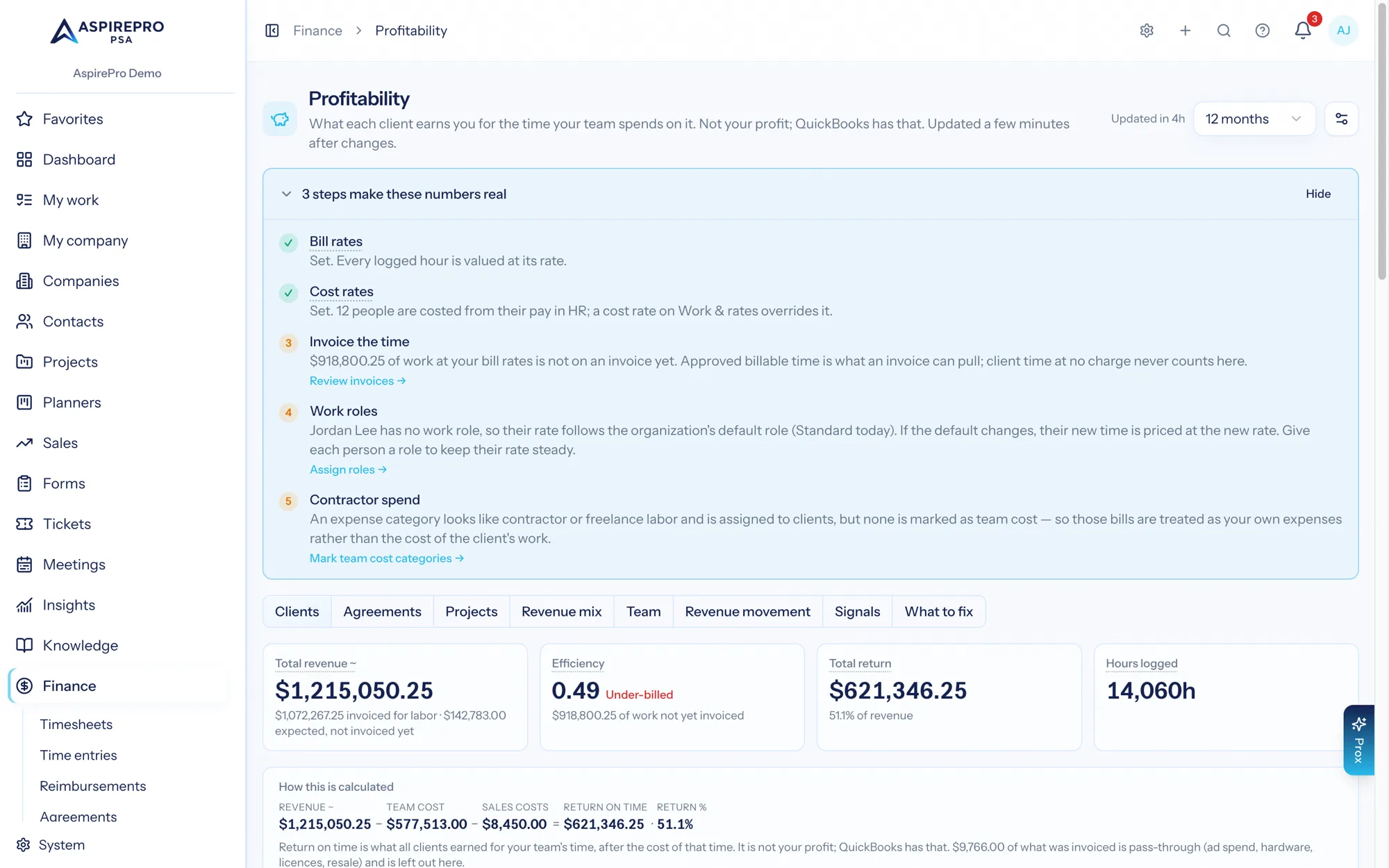
The KPI row#
Four tiles, computed over every client in the period — before the status filter, so narrowing the grid never changes them. Each carries a one-line sub-text saying what it is made of.
- Total revenue — revenue counted the way you chose. When counting what agreements should bill and any expected revenue is present, it reads Total revenue ~ and the sub-line gives the split: "$X invoiced · $Y expected, not invoiced yet". Otherwise, when part of the invoiced money is pass-through, the sub-line says so.
- Efficiency — labor invoiced across the book divided by the value of every logged hour at bill rates, with its band word: Under-billed, On target or Above the hours. With nothing invoiced it reads — · $X not yet invoiced; for a period built before the measure, Not measured yet. Efficiency →
- Total return — the sum of every client's return, on the same setting, with Return % as its sub-line. Red when negative. When no client in the period carries any recorded cost it reads Team cost not set instead of a dollar figure, with a Set cost rates → link for people who can, and "Ask an administrator to set cost rates" for people who cannot.
- Hours logged — hours logged across every client, billable and not; the sub-line names how many carry no cost rate.
Under the tiles, How this is calculated shows the subtraction with the period's real numbers: Revenue − Team cost = Return on time, with a − Contractors term when subcontract labor was recorded, a − Client expenses term when the switch is on and a − Sales costs term when there are commissions or referral fees, and Return % beside it. When the value of the work is known, a second line shows Labor invoiced ÷ Work at bill rates = Efficiency, and its sentence points to the Bill rates row of the collapsible What's behind these numbers panel below, which lists the rates in force and links to where they are changed.
The columns#
Eight columns show by default. The rest are in the Columns menu above the grid; your choice is remembered, and Reset to default at the bottom of the menu puts the default set back.
Column | Default | What it is |
|---|---|---|
Client | yes | Name, linking to the client report, with the company's status chip and an Archived badge where it applies. |
Revenue | yes | Revenue counted the way you chose. An amber ~ means it contains expected revenue; a small line under the figure says how much was invoiced, and the hover gives the split. |
Team cost | yes | Logged hours × the cost rate on each entry. Zero where no hour carried a rate. |
Client expenses | yes, only while Include client expenses in return on time is on | Expenses assigned to the client in QuickBooks, client-linked reimbursements, and card-processing fees. Absent entirely when the switch is off. |
Return | yes |
|
Return % | yes |
|
Share of work | yes | This client's share of the work your team finished. |
Est. return ~ | yes, once a team cost rate is set |
|
Trend | yes | A line of monthly return, on the same setting as the Return cell, so the points add up to it. |
Sales costs | menu | Commissions and referral fees recorded by pay rules for this client. They come off Return after team cost. |
$/hour earned | menu |
|
Hours logged | menu | Hours logged. |
Efficiency | menu |
|
Tickets opened | menu | Tickets opened for this client in the period — demand, not delivery, and with no status filter, so an auto-created spam ticket counts. |
Work vs revenue | menu | Share of work minus share of revenue, in percentage points. Muted at or below +5, amber above +5, red above +15. |
Est. team cost ~ | menu, once a team cost rate is set | The work with no logged time, priced by assumption. Hover for the arithmetic: each item type × its hours, any items with their own estimate, the total hours × the rate, and, when a range is set, "Give or take N%: between $low and $high." |
Every column is sortable except Trend. Rows are shaded: a red left border for a negative return, an amber one for a return below 15%.
When the estimate is on, a footnote under the grid restates the assumptions: "~ Est. team cost prices work nobody logged time on: Ah per ticket, Bh per task, Ch per meeting, at $R/h, or the item's own estimate where it has one. Work with logged time uses its real cost instead. Est. return is Return minus that estimate. Both are estimates based on your assumptions and never change the recorded Return. Change the assumptions in Settings."
Definitions live on their own pages: return on time and the hidden percentage, counting revenue, the cost sources, share of work and the estimate.
The banners above the grid#
Three things can appear between the tiles and the table, and all three read what was recorded rather than a setting.
- "No time with a cost rate has been logged yet, so the Return column is really just revenue." — red. No cost reached any client, so the Return column is revenue. With client expenses switched on it reads "No costs are recorded yet" instead. How to fix this opens the Where costs come from dialog. With Include client expenses in return on time on, it lists two remedies: 1. Cost rates on work roles (with an Open Work & Rates → link) and 2. Expenses assigned to a client (with Open expenses →, or Connect QuickBooks → when it is not connected). With the switch off it lists one remedy, cost rates, and no number. Either way it ends: "Until then, the Share of work column is the best read on which clients take up your team's time. It needs no cost data at all." The No costs recorded chip in the Return % column opens the same dialog.
- "N hours of logged time has no cost rate." — amber. Some cost is recorded, but logged hours carry no cost rate, so the return reads better than it is. The banner says how much of revenue recorded costs cover so far.
- The share-of-work lines — always present when work was counted: how many work items the team finished ("tickets closed, project tasks completed and client meetings held. Each item counts as one, whatever its size."), plus how much went to companies that paid nothing (with Show them →) and how much is not linked to any client (with See what to fix →) where they are non-zero. If there is no counted work, a muted line takes their place, and there are two: "Work has not been counted for this period yet, so the Share of work column is unknown rather than zero. It fills in as the nightly update runs." when the period was built before work was counted, and "No tickets were closed, project tasks completed or client meetings held in this period, so there is no work to share out. Work counts in the month it is finished, so anything still open is not in here yet." when it was counted and came to nothing.
Before any of that, with no client rows at all, the tab shows an empty state: Nothing to show yet — "Profitability numbers update a few minutes after time, invoices or expenses change. Once there is something to count, each client appears here."
Where each client sits#
Each dot is a client: revenue across, return % up, with dashed lines at the middle of the pack on both. The four corners are four conversations:
- Top right — big, with a strong return — keep and protect.
- Bottom right — big but thin — fix: reprice, rescope, or find where the hours are going.
- Top left — small, with a strong return — grow: the model works, there just isn't enough of it.
- Bottom left — needs a look.
Only clients with a return percentage are plotted, so a client reading No costs recorded does not appear. With no client plotted at all, the chart shows an empty state pointing at the same remedies as the banner.
Filters and what stays visible#
- Company status filter — above the table, defaulting to all statuses. A former client's historical return is labelled, not hidden.
- Period selector — 3, 6, 12 (default) or 24 months, ending with the current month, which is still in progress. Note that Revenue Movement and Signals ignore it: both always read the last completed month.
- Archived companies keep their history, marked Archived, and still open. A company deleted outright has nothing to open, so its rows drop off the list.
Why a company might not be on this list#
Only actual clients get a row. A company's month must have at least one of: invoiced revenue, collected cash, team cost, hours logged, billable hours, hours with no cost rate, client expenses (recorded whether or not Include client expenses in return on time is on), billable value — or a live agreement, or an expectation from one. Ticket, task and meeting counts are not on that list, deliberately: if they were, every company an inbound spam ticket auto-created would become a client and the grid would fill with noise.
Companies that fail the test in a month are left out before their row is ever written, and a read-time filter catches any stale row built before the rule existed. Their work is not lost — it moves to the companies that paid nothing line above the grid, where you can open the list of names and item counts.
Worked example — one row, every cell#
Rivera Group, June 2026, on the default revenue setting, with client expenses switched on, the estimate assumptions set to 2 h / 4 h / 0.5 h at $65.00 and every column switched on.
Cell | Value | Where it comes from |
|---|---|---|
Revenue | $9,900.00 ~ | $6,000.00 invoiced (INV-1042, issued 5 Jun) + $3,900.00 expected (26.0 h × $150.00 of T&M work in progress) |
Team cost | $6,437.00 | 62.0 h × $65.00 + 41.5 h × $58.00 + 18.0 h with no cost rate |
Client expenses | $594.30 | $420.00 assigned to Rivera in QuickBooks + $174.30 card fee on INV-1042 |
Return | $2,868.70 | $9,900.00 − $6,437.00 − $594.30 |
Return % | 29.0% | $2,868.70 ÷ $9,900.00 |
$/hour earned | $81.48 | $9,900.00 ÷ 121.5 h |
Hours logged | 121.5 | 62.0 + 41.5 + 18.0 |
Tickets opened | 9 | tickets opened in June — three fewer than the twelve closed, because some were opened earlier |
Share of work | 8.4% | 61 items (12 closed + 31 tasks + 18 meetings) ÷ 728 finished across the organization |
Work vs revenue | +5.3 pts | 8.4% − 3.1% ($9,900.00 ÷ $320,000.00) — amber, above +5 |
Est. team cost ~ | ~$4,192.50 | 64.5 estimated hours × $65.00 |
Est. return ~ | ~−$1,323.80 | $2,868.70 − $4,192.50 |
The row is not shaded — 29.0% is above the 15% amber line. Read across it and the account tells a coherent story: it looks healthy on recorded cost, but it takes more of the team than it produces of the revenue, and pricing the unpriced work puts it underwater.
Worked example — a company that is not on the list, and where its work went#
Aldridge Supply opened six tickets in June asking about a project they never bought. All six were closed in June. Aldridge has no invoice, no agreement, no logged time and no expenses.
- Aldridge fails the test above, so no row is written for it.
- Its six work items are captured before the row is dropped and land in the companies that paid nothing total: part of the 45 items, 6.2% of the month.
- Clicking Show them → lists Aldridge Supply — 6 items next to the other eight companies. Company names and counts only: Profitability is a finance grant, not a Service Desk grant, so no ticket subject is shown.
Both halves matter. Aldridge is not a client and must not distort the client grid, and six tickets of your team's June is a real fact that must not disappear from the work total everyone else's share is measured against.
Once a quarter, switch on Work vs revenue and sort by it rather than by return. Return tells you what a client earned for the team's time; the gap tells you what it is about to cost you.