Finance → Profitability puts a Return on time figure next to every client, every agreement and every month. This page is the arithmetic behind it, in the order it runs, with the reference month from the Profitability overview computed to the dollar.
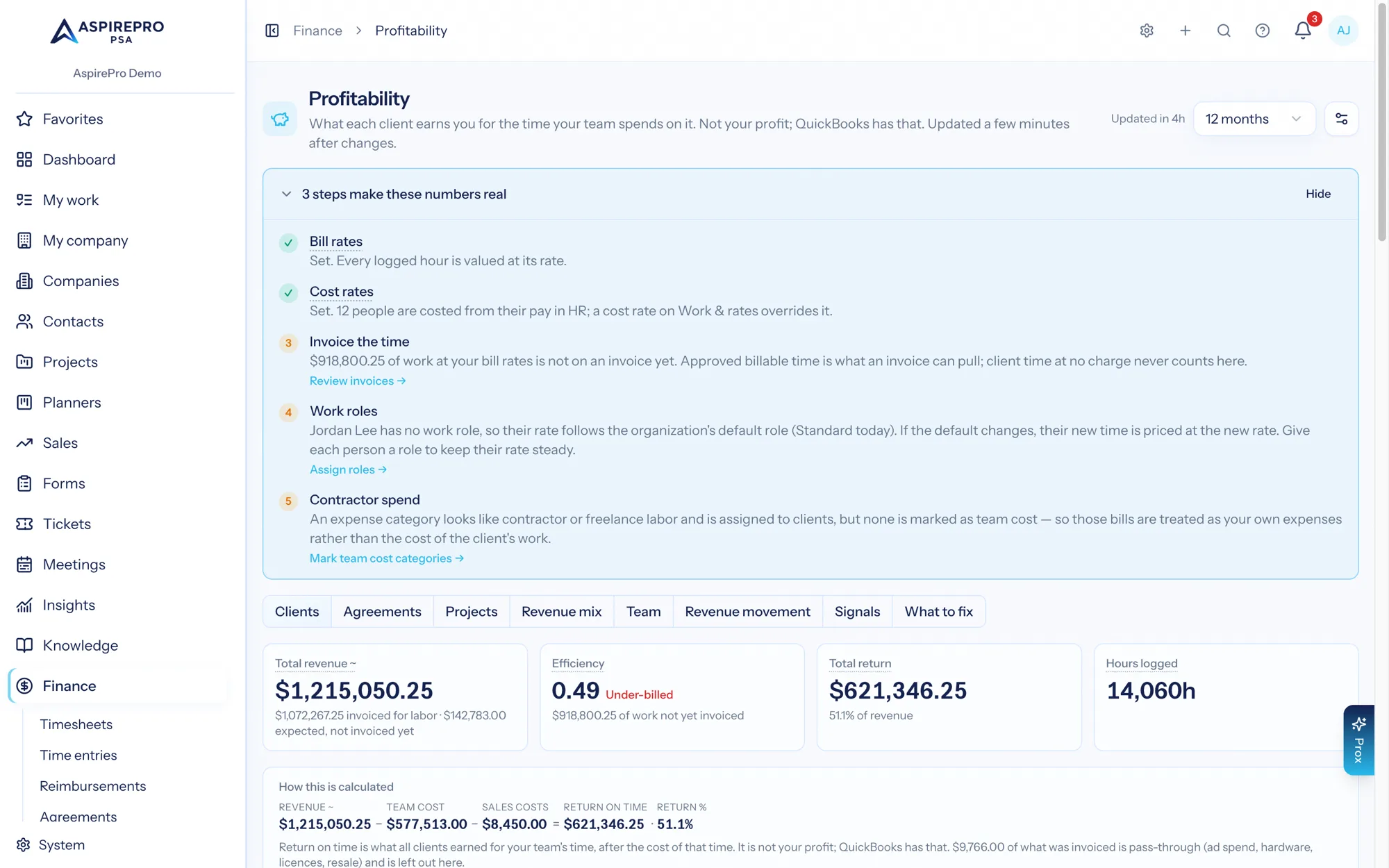
Return on time is what a client earns you for the time your team spends on it. It is not your profit: your profit lives in QuickBooks, after every business expense. This figure answers a different question: is this client worth the team's time?
Return on time is revenue minus the recorded cost of your team's time, including contractors who did the client's work and, when pay rules record them, commissions and referral fees. Client expenses come off it too, but only when Include client expenses in return on time is on; it is off by default. Rent, software and payroll taxes are never taken off it. The screen says Return on time (Return, for short), and so do these pages.
The calculation#
revenue        = invoiced + expected            (expected only when counting what agreements should bill)
return on time = revenue − team cost − contractors − sales costs
                                                (− client expenses, when that switch is on)
return %       = return ÷ revenue               (hidden when no cost was recorded)
$/hour earned  = revenue ÷ hours logged
Five terms, one of them behind a switch, and nothing hidden between them:
- Revenue — issued invoices dated inside the month, before sales tax (tax you collect is remitted, not earned, so a $10,000 invoice with $1,000 tax is $10,000 of revenue), plus, on the default setting, what live agreements were expected to bill in the months no invoice covered. Voided and draft invoices are never revenue. Cash collected is reported separately and includes tax, because that is what the customer paid. The full ladder →
- Team cost — each logged hour priced at the cost rate recorded on that time entry, plus team pay from agreements. Not the bill rate, and not a rate looked up today. Every rule →
- Contractors — subcontract labor: contractor spend assigned to the client in a category marked Team cost. It counts whatever the client expenses switch says. Contractor and subcontract labor →
- Sales costs — commissions and referral fees recorded by pay rules, taken off after team cost. Pay from agreements →
- Client expenses — only when Include client expenses in return on time is on: expenses assigned to that client in QuickBooks, client-linked reimbursements, plus the processing fee on any card payment against the client's invoices. With the switch off (the default) this term does not exist, and no expense column, row or card appears anywhere in Profitability.
- Nothing else. There is no allocated-overhead term. Spend that belongs to no client stays out of every client's return.
Every Profitability view shows this subtraction with the real numbers plugged in, under the heading How this is calculated: Revenue − Team cost = Return on time, with a − Contractors term when there is subcontract labor, − Client expenses when the switch is on and − Sales costs when there are commissions or referral fees, and the Return % beside it. On the Clients tab it uses the organization totals; on a client's page it uses that client's totals.
Return, and when it is withheld#
When no cost at all was recorded for a client, agreement or period — no logged hour at a cost rate, no subcontract labor, and (with the switch on) no expense assigned to it — the Return amount is withheld as well as the percentage. The tile reads Team cost not set and the cell reads —, because revenue − 0 is just the revenue, and a Return column that quietly repeats the Revenue column is the flattering artefact this page refuses to print. The tile links to Work & Rates for people who can set cost rates and says "Ask an administrator" for people who cannot; one assumed team rate under the estimate settings lifts the withholding too, as an estimate labelled as one.
Return %, and when it is hidden#
Return % is return ÷ revenue. It is left blank in two cases, and the page tells them apart:
- No revenue — the cell reads
—. There is nothing for a percentage to be a percentage of. - No costs recorded — the cell reads No costs recorded, as a muted chip. On the Clients grid the chip is clickable and opens the Where costs come from dialog; everywhere else (the Agreements grid, the client page's tiles and agreements table, the Return % tile) it is a plain badge with the same hover text. That hover text follows the switch. With Include client expenses in return on time off: "No time with a cost rate has been logged for this row, so a return percentage would just read 100%. Set cost rates under Work & Rates to get a real one." With it on: "No costs are recorded for this row — no logged time with a cost rate and no expenses assigned to it — so a return percentage would just read 100%. Set cost rates or assign expenses to get a real one." This is the important one.
The reason is arithmetic. If a client has revenue and neither logged time at a cost rate nor expenses assigned to it, then return = revenue − 0 = revenue, and the percentage is exactly 100%. That figure comes from data that is missing, not from a result, and printing it would be the single most misleading number the module could produce. So it is hidden — everywhere, including the headline Return % tile, the "Where each client sits" chart, and the client PDF.
The rule reads what was recorded, not a setting: each monthly row records whether any cost reached it — a logged hour at a cost rate, an expense line assigned to the client of either sign (a vendor credit is stored negative), a card-processing fee. It is not a question of whether the costs net to a positive number: $100 of recorded team cost beside a $100 client credit is still recorded, and a client whose only expense is a credit has a real return above 100%, not a missing one. There is no way to switch it off, and no setting or limit changes it.
A client whose card fees are the only recorded cost still has a percentage. A $58 processing fee is a genuinely recorded cost, so the chip stands down — and the Cost completeness row of the "What's behind these numbers" panel will say that $58 is all the cost your revenue carries.
Two return figures, one calculator#
There are two places a return figure lives, and they are on purpose:
- The stored column on each monthly row is always on the invoices-only setting. Signals compare it across clients and months, so it has to be a single number that does not move when someone changes a setting.
- Everything you read — the grids, the totals, the drill-in month tables, the trend line, the client page, the PDF and the Insights widgets — recalculates the subtraction on the revenue setting you chose, through one shared calculator.
Because both paths run the same code, a row can never contradict the total above it, and a dashboard widget can never contradict the page. This was not always true: before the fix the drill-in month table read the stored value while the total above it recalculated on the default setting, and the Return on Time by Client widget summed the stored column while the page defaulted to counting agreements. Both now consult the same setting.
The KPI row reads on one setting#
The four tiles above the Clients grid are on the same revenue setting as the Return beside them, so you never compare a cash figure with one that includes expected revenue by accident:
- When counting what agreements should bill, and any expected revenue is present, the first tile reads Total revenue ~ and its tooltip gives the invoiced/expected split.
Total revenue − team cost = Total return, exactly — with client expenses taken off too when the switch is on. - On Invoices only, or when nothing was expected, it reads Total revenue and the same subtraction holds.
The amber ~ is the page's mark for "this figure contains something nobody invoiced, or something estimated". It appears on the Total revenue ~ tile, on each Revenue cell that carries an expectation, on the client page's Revenue ~ tile, on the Est. team cost ~ and Est. return ~ column headers (on the Clients grid, the Agreements grid and the client page's agreements table), and on the client page's Estimated team cost ~ heading.
Worked example — the reference month, line by line#
Rivera Group, June 2026, counting revenue on the default setting (invoices, plus what agreements should bill), with client expenses switched on so every term can be shown.
Revenue
- Rivera Monthly Retainer (monthly retainer, $6,000): INV-1042 issued 5 June for $6,000.00. An invoice always replaces the expectation for the agreement-month it covers, so this agreement expects nothing further.
- Rivera Website Rebuild (time & materials): no invoice in June, 26.0 billable hours at a $150.00 bill rate.
invoiced   $6,000.00
expected   26.0 h × $150.00 = $3,900.00
revenue    $6,000.00 + $3,900.00 = $9,900.00
Team cost
Person | Hours logged | Cost rate | Team cost |
|---|---|---|---|
Dana Okoye | 62.0 | $65.00 | $4,030.00 |
Marc Ellis | 41.5 | $58.00 | $2,407.00 |
Priya Shah | 18.0 | — | $0.00 |
Total | 121.5 | $6,437.00 |
Priya's 18.0 hours have no cost rate — real logged hours with no rate on file. They count as hours, they raise the badge on the Team tab, and they are named in the "What's behind these numbers" panel, but they add nothing to cost, so this return reads higher than it really is by whatever those hours actually cost.
Client expenses (only because the switch is on)
stock-photo licence, assigned to Rivera in QuickBooks    $420.00
card-processing fee on INV-1042 ($6,000 × 2.9% + $0.30)  $174.30
client expenses                                          $594.30
The result
return         $9,900.00 − $6,437.00 − $594.30 = $2,868.70
return %       $2,868.70 ÷ $9,900.00           = 29.0%
$/hour earned  $9,900.00 ÷ 121.5 h             = $81.48/h
The $/hour earned is what the account actually earned per hour logged — against a $150.00 rate card. Note that it divides by all logged hours, billable or not: non-billable work on a client is still work you paid for.
Worked example — the same month, both ways of counting revenue#
Nothing about the cost side changes. Only the revenue term moves, and it drags all three derived figures with it.
Invoices, plus what agreements should bill (default) | Invoices only | |
|---|---|---|
Revenue | $9,900.00 | $6,000.00 |
Team cost | $6,437.00 | $6,437.00 |
Client expenses | $594.30 | $594.30 |
Return | $2,868.70 | −$1,031.30 |
Return % | 29.0% | −17.2% |
$/hour earned | $81.48/h | $49.38/h |
Both are true statements about June. The default says the month was worth $9,900 and we did well; Invoices only says we have billed $6,000 for it so far and, against what it cost, we are underwater until the rebuild work is invoiced. That is exactly the difference between a contractual view and a cash view, and it is why revenue counting is a setting rather than a fixed choice. When to pick which →
Worked example — a client with no recorded cost#
Aldridge Consulting, June 2026: one $12,400.00 invoice, no time logged by anyone, QuickBooks not connected, paid by bank transfer so there is no processing fee.
revenue          $12,400.00
team cost             $0.00
client expenses       $0.00
return           $12,400.00
return %         $12,400.00 ÷ $12,400.00 = 100.0%  →  HIDDEN
The grid shows a Return of $12,400.00 and a Return % of No costs recorded. Clicking the chip opens Where costs come from. With Include client expenses in return on time on it lists the two things that would fix it: cost rates on work roles under System → Work & rates, and assigning client-specific expenses to their Customer in QuickBooks. With the switch off it lists one remedy, cost rates, because expenses are not part of the figure. The Cost completeness row of the "What's behind these numbers" panel says the same thing for the whole period, and a banner above the grid repeats it when no client in the period carries any recorded cost.
This is also why the share of work column exists. For Aldridge, "8.4% of the team for 3.1% of the revenue" is a real, assumption-free answer available on day one, while a return percentage is not.
Read this page with Costs next to it — most of the surprise in a first return figure comes from the time-entry rules, not from the subtraction.