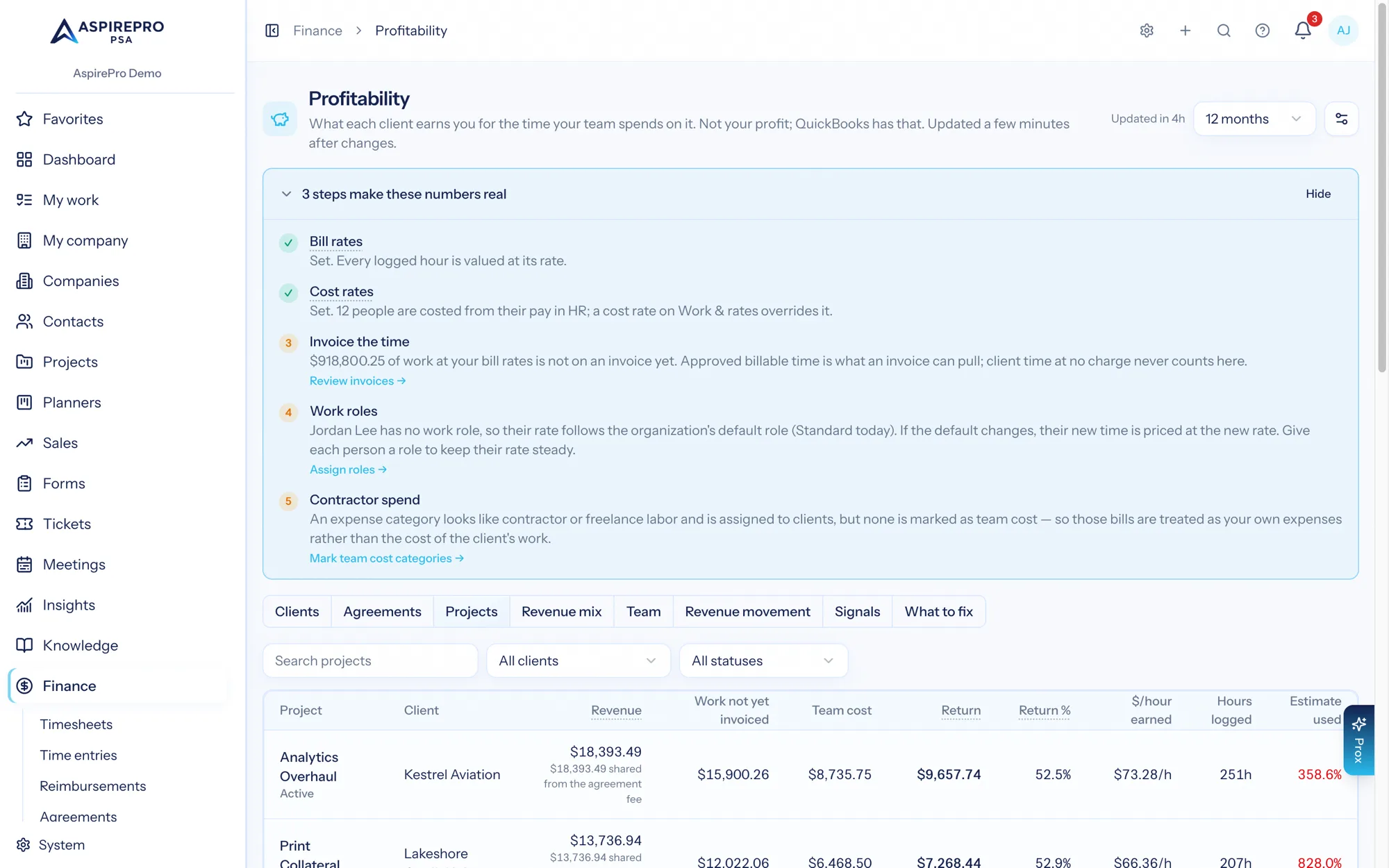
Finance → Profitability → Projects answers one question per project: is it making money for the time your team spends on it? The tab shows while the Projects module is switched on.
What is on the tab#
Column | What it is |
|---|---|
Project | The project and its status. Click it to open the project's Profitability tab. |
Client | The project's client. |
Revenue | What was invoiced for the project's work: the invoice lines that bill it (time, job charges, items picked for it), plus its share of the agreement fee — shown underneath. |
Work not yet invoiced | The value of the work at bill rates that hasn't been invoiced yet. Time given at no charge is never counted here, and work a prepaid block covers is shown apart. |
Team cost | The logged time at each person's cost rate. When part of it uses a role rate (the person's pay isn't set), the estimate is shown underneath. |
Return | Revenue minus team cost. |
Return % | Return ÷ revenue. Cost not measured when no cost was recorded. |
$/hour earned | Revenue ÷ hours logged. |
Hours logged / Estimate used | Hours on the project and its tasks, and the share of the project's estimated hours they use. |
Filter by client, status or name; the filters stay in the page address. The line under the table shows the client work in the period that isn't on any project.
How an agreement fee is shared#
An agreement's fee (a retainer, say) pays for work on several projects. Profitability shares each fee across the projects and people who did that month's work on the agreement, by the value of the work (hours × bill rate; hours when there are no bill rates), to the cent. A fee for August billed in September is shared by August's work. You can switch sharing off in the Profitability settings (Share agreement fees across projects and people); project and team figures update a few minutes later.
Prepaid hours blocks and product fees are never shared, and work on the agreement with no project stays "not on a project".
What isn't counted on a project#
- Tickets linked to a project are counted on the client, not the project.
- On the default setting, projects count invoiced revenue only — work done but not invoiced yet is shown beside it, never added in.
Where project revenue comes from#
If you invoice outside AspirePro, set Where project revenue comes from to Agreement value in the Profitability settings. Each project then gets its share of what its agreement expects that month, until an invoice replaces it. It needs agreement fees shared by the value of the work, and it counts only while revenue includes what agreements should bill (Count revenue from). The default, Invoices (recommended), is right when you invoice in AspirePro. Changing it updates project and team figures within a few minutes.
The project's own Profitability tab#
Every project has a Profitability tab (for project members who can see Profitability): revenue, return, $/hour earned and hours for the last 12 months, the sum in words, a month-by-month chart and table, where the revenue came from, and — for people who can see team economics — each person's revenue, cost and return on the project.