Finance → Profitability → Agreements prices your contracts against reality. Where the Clients tab asks "is this relationship worth it", this tab asks "is this contract worth it" — and for a fixed fee or a retainer, that is the question the rate card cannot answer.
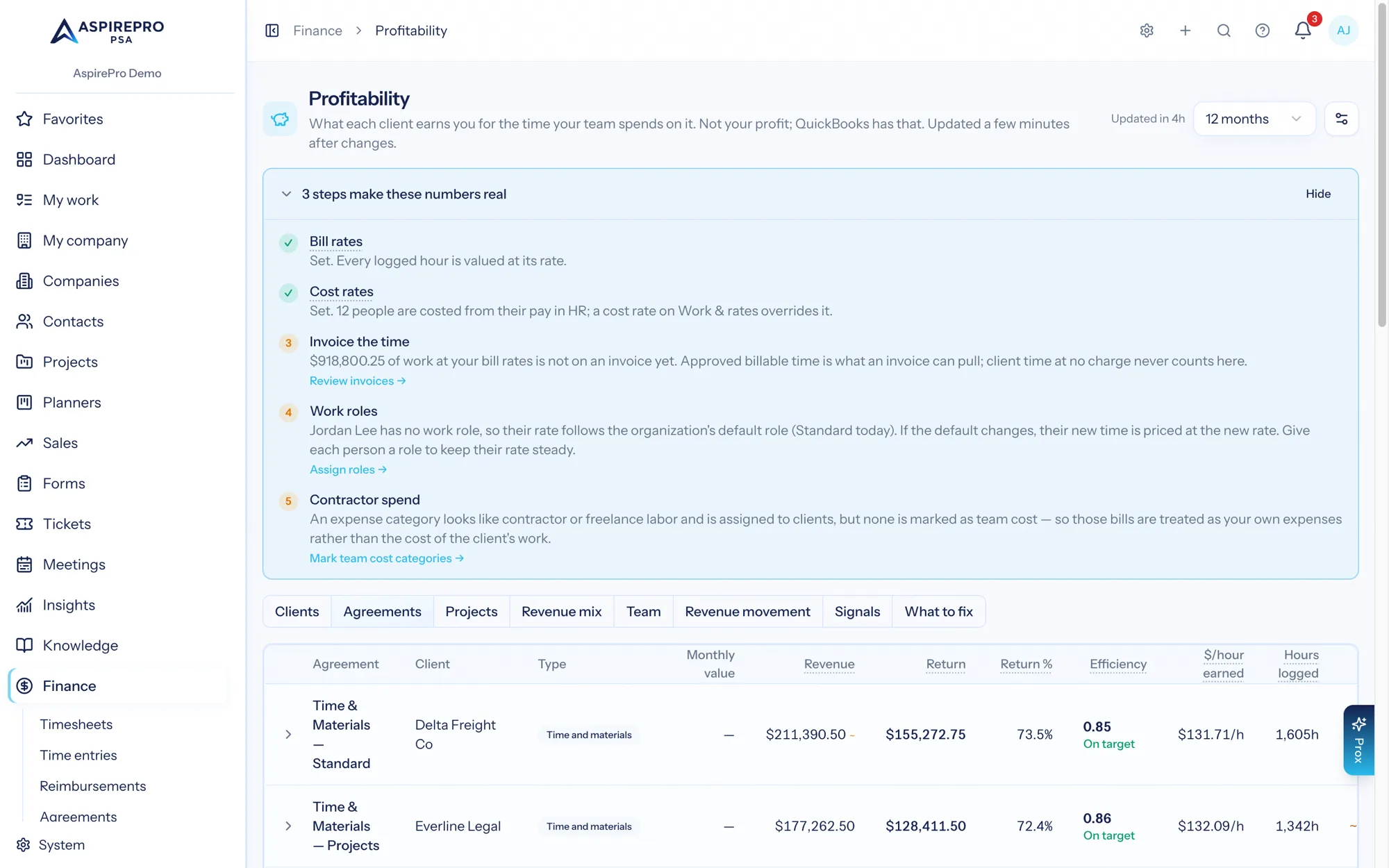
The columns#
Column | What it is |
|---|---|
Agreement | The agreement's name. Click the row to expand its month-by-month chart. |
Client | The company, linking to its client report. |
Type | Retainer, Fixed fee or Time & materials, taken from the agreement's effective billing model — inherited from a parent agreement where one applies. |
Monthly value | The agreement's monthly recurring revenue, from the most recent month in the period that captured one. Not a sum across months. |
at risk | A red badge beside Monthly value when that month's snapshot recorded the agreement as lapsed — past its end date with recurring value still attached. How lapsing works → |
Revenue | Revenue counted the way you chose, summed across the period. An amber ~ means it contains expected revenue. |
Return |
|
Return % |
|
Efficiency |
|
$/hour earned |
|
Hours logged | Hours logged against this agreement. |
Est. return ~ | Only once a team cost rate is set. |
Rows are sorted by return, shaded red below zero and amber below 15%. With no rows at all, the tab reads "No agreement figures for this period yet. Numbers update a few minutes after time, invoices or expenses change." Agreements that have since been deleted still appear where their history is inside the period: frozen history outlives the paper.
There is no Share of work column here, because a closed ticket belongs to a company, not to a contract. There is an Est. return ~ column when the estimate is switched on: it prices the finished work whose ticket or project points at this agreement. Work that points at no agreement stays on the client page as "not assigned to an agreement".
The month-by-month drill#
Click any row (the chevron at its left turns down) and the chart slides open beneath it with a smooth animation: a bar of revenue counted the way you chose, and a line of cost for each month in the period. Its caption reads "Revenue against team cost by month.", or "Revenue against cost (team cost plus client expenses) by month." when Include client expenses in return on time is on, with "Months marked * are still in progress." added when the current month is in view. An agreement with no monthly rows shows "No monthly figures for this agreement." in place of the chart.
Three things to know about it:
- It exists for every billing model, not only fixed fee. A time-and-materials agreement's revenue line should track its cost line; a retainer's should be flat while its cost wobbles. Both are worth looking at.
- The bar is revenue, not the fee. When counting what agreements should bill, a month with no invoice shows what the contract expected; on Invoices only, it shows zero. It is not the agreement's amount.
- Months marked
*are still in progress — the current month is still accumulating, so a dip at the right-hand end usually means "the month isn't over". See Freshness and history.
$/hour earned is the fixed-fee test#
For a time-and-materials contract, $/hour earned is close to your bill rate by construction. For a fixed fee or a retainer it is the whole story: the fee is constant, the hours are not, and $/hour earned is the fee divided by however many hours the month actually took. Watch it fall and you are watching scope creep, priced.
Why agreement return never sums to the client's return#
This is expected. With client expenses switched on it has one main cause: an expense in QuickBooks is assigned to a customer, not to an agreement.
When a supplier invoice is assigned to a client in QuickBooks, there is genuinely no fact in it that says which of that client's three contracts it belongs to, and the module will not invent one. So client expenses from QuickBooks land on the client only, and every agreement's return is higher than its true share by whatever expense sits above it.
Two smaller sources of the same effect, and the only ones while the switch is off:
- Time with no agreement — hours logged on a ticket or project that resolve to a client but carry no agreement reach the client only. So a client's hours and team cost can exceed the sum of its agreements'.
- Invoices with no agreement — an ad-hoc invoice is client revenue with no contract to sit under. The What to fix tab counts them.
Card-processing fees, when counted, are the exception that does reach the agreement, because the payment's invoice names one.
Worked example — a fixed fee overtaken by its cost#
Northwind Brand Refresh, fixed fee, $7,500.00 invoiced each month, January to June 2026, with client expenses switched on. All hours priced at a $65.00 cost rate.
Month | Revenue | Hours logged | Team cost | Client expenses | Return | Return % |
|---|---|---|---|---|---|---|
Jan | $7,500.00 | 48.0 | $3,120.00 | $0.00 | $4,380.00 | 58.4% |
Feb | $7,500.00 | 66.0 | $4,290.00 | $145.00 | $3,065.00 | 40.9% |
Mar | $7,500.00 | 87.0 | $5,655.00 | $0.00 | $1,845.00 | 24.6% |
Apr | $7,500.00 | 106.0 | $6,890.00 | $310.00 | $300.00 | 4.0% |
May | $7,500.00 | 125.0 | $8,125.00 | $0.00 | −$625.00 | −8.3% |
Jun | $7,500.00 | 146.0 | $9,490.00 | $220.00 | −$2,210.00 | −29.5% |
Total | $45,000.00 | 578.0 | $37,570.00 | $675.00 | $6,755.00 | 15.0% |
$/hour earned $45,000.00 ÷ 578.0 h = $77.85/hAgainst a $150.00 rate card, this contract delivered at half price on average and at a loss for the last two months. The row reads 15.0% and shades amber; the chart shows the crossing in April; the $/hour earned says how far the fee has drifted from the work. That is the repricing conversation, with a date on it.
Worked example — the client's return does not match its agreements#
Rivera Group, June 2026, on the default revenue setting, with client expenses switched on.
Revenue | Team cost | Client expenses | Return | Return % | Hours logged | $/hour earned | |
|---|---|---|---|---|---|---|---|
Rivera Monthly Retainer | $6,000.00 | $4,427.00 | $174.30 | $1,398.70 | 23.3% | 71.5 | $83.92 |
Rivera Website Rebuild | $3,900.00 ~ | $2,010.00 | $0.00 | $1,890.00 | 48.5% | 32.0 | $121.88 |
Sum of agreements | $9,900.00 | $6,437.00 | $174.30 | $3,288.70 | 103.5 | ||
Rivera on the Clients tab | $9,900.00 ~ | $6,437.00 | $594.30 | $2,868.70 | 29.0% | 121.5 | $81.48 |
$3,288.70 − $2,868.70 = $420.00Exactly the stock-photo licence assigned to Rivera in QuickBooks, which belongs to no agreement and therefore appears only at the client level. The hours differ too — 103.5 against 121.5 — because Priya Shah's 18.0 hours were logged on a ticket with no agreement on it. That is also why the client's $/hour earned ($81.48) is below both of its agreements': the client figure divides by hours no contract claimed.
The client figure is the one to quote. The agreement figures are for comparing contracts with each other.
If a client's agreement return looks implausibly good next to its client return, open What to fix — "Invoices without agreement" and "Expenses not assigned to a client" are usually the two lines doing it.