Finance → Profitability → Signals is a worklist, not a score. Six rules read the stored monthly numbers and write plain sentences naming a client and the arithmetic behind the claim. There is nothing hidden: every limit is on the page and yours to edit, and every card prints the numbers it fired on.
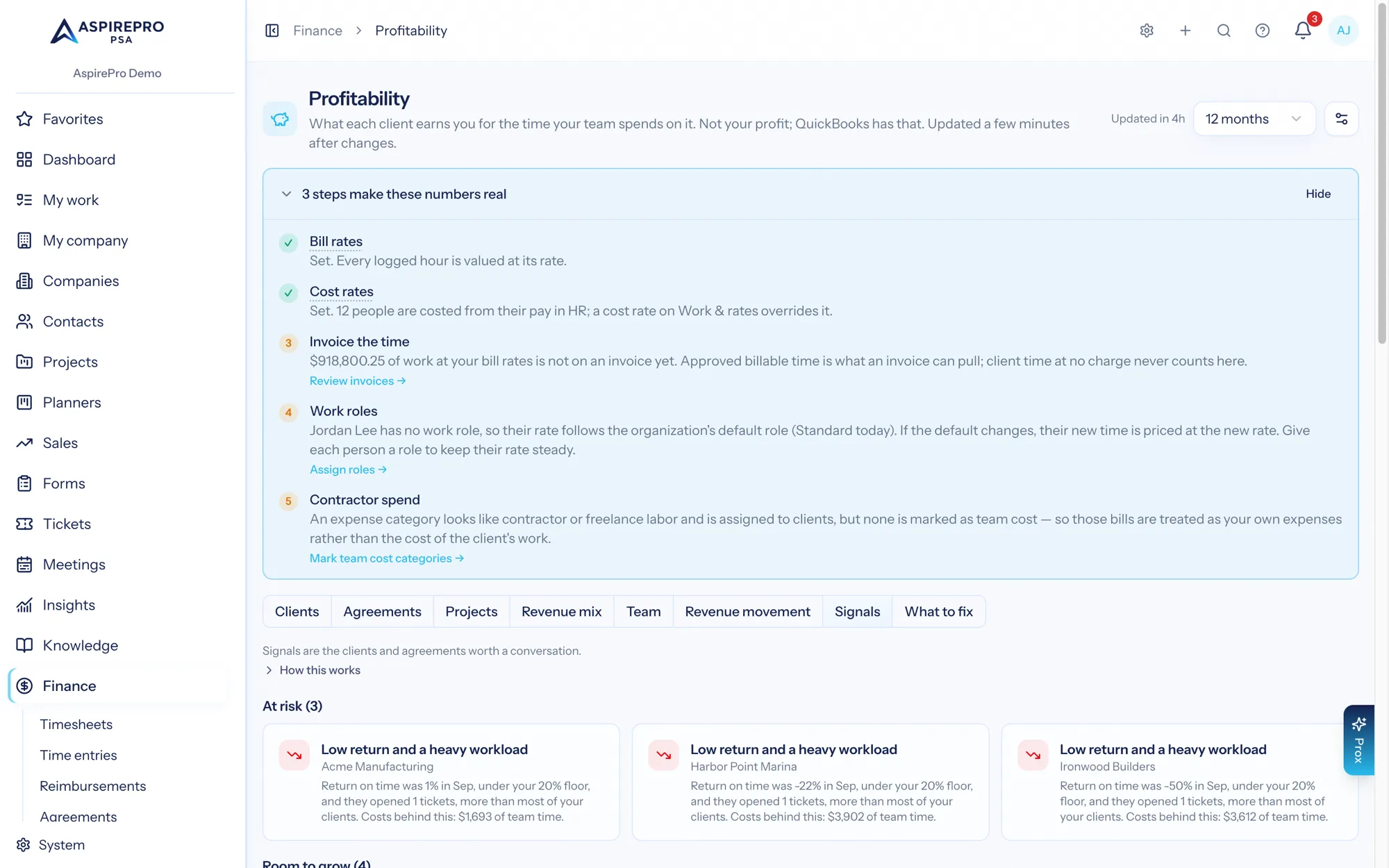
Cards are grouped into five families, each a heading with its count: At risk, Takes more than it pays, Room to grow, Earning below your usual and Billed less than the work was worth. Every card shows a headline, the client's name (linking to its client report) and one line of detail with the numbers in it. When nothing fires, the tab shows a green tick and "Nothing flagged. Every client is within your limits."
Under the cards, a Your limits line summarises the current limits in one sentence: "Your limits: recurring revenue drop N%, return floor N%, room to grow at Nh or N work items, work vs revenue gap N points, earnings floor N% of your usual rate", with the Edit limits button beside it for anyone holding Manage Finance Settings.
What signals look at, and why it differs from the grid#
Signals deliberately read a different slice from the tabs above them, and the tab says so in a line at the top:
- Finished months only. At risk, Room to grow, Earning below your usual and Billed less than the work was worth look at the last finished month. Takes more than it pays looks at the last three finished months. A dip in a month still in progress is usually just "the month isn't over".
- Invoiced revenue only, whatever your revenue setting is. A worklist that changes because someone flipped a setting is not a worklist.
- The period selector is ignored. Choosing 24 months does not widen a scan.
The line at the top also says which families need what: "Low return" needs recorded costs and "earning below your usual" needs logged time; "takes more than it pays" needs neither.
So a figure quoted on a card can legitimately differ from the same client's row on the Clients tab. That is the trade: the grid answers "what is this relationship worth on my terms", the signals answer "what changed, on one fixed basis, that I should act on".
Who can raise a signal#
Three kinds of company raise nothing, ever:
- Inactive companies — a churned client's falling recurring revenue is history, not an alert.
- Archived companies — off the book entirely. Their history still shows on the Clients tab, labelled.
- Companies deleted outright whose stored rows outlived them.
Their revenue is still counted in the "takes more than it pays" revenue total when they were on the books, so a share the page and the signal disagree about cannot happen.
The six rules#
1. At risk — "Monthly revenue has dropped two months in a row"#
Fires when a client's total monthly recurring revenue fell by at least Recurring revenue drop (%) into the last completed month and by at least the same percentage into the month before it. Both drops must clear the bar; one bad month is not a pattern.
- Default 10. Editable 1–90.
- Blind spot: it only sees agreements with recurring value. A time-and-materials client winding down shows nothing here.
2. At risk — "Low return and a heavy workload"#
Fires when all four hold in the last completed month:
- the client's return % is below the Return floor (%), and
- its tickets opened are at or above the third quartile of every client that month, and
- it has invoiced revenue above zero, and
- a cost was actually recorded for it — logged time at a cost rate or, with client expenses switched on, an expense assigned to it.
That last condition is the important one. Without it the rule would fire on a fiction: a client with no recorded cost has a 100% "return", which is not a return figure at all. See the hidden percentage.
- Default floor 20. Editable 0–90.
- The quartile is computed over the tickets-opened figures of every client row in that month, so it moves with your own book.
- The detail ends with the costs behind it: "Costs behind this: $X of team time", plus "and $Y of expenses" only while Include client expenses in return on time is on.
- Blind spot: it needs both recorded cost and ticket volume. A quiet, expensive project client will not appear here.
3. Takes more than it pays — "Takes more of your team's work than it pays for"#
Fires when a client's share of the work your team finished exceeds its share of the invoiced revenue by at least the Work vs revenue gap (points), over the last three completed months, and the client has some invoiced revenue in them.
This is the family that needs nothing: no cost rates, no logged time, no QuickBooks connection. It is why an organization that logs no time still gets a Monday digest.
- Default 10 points. Editable 1–100, in half-point steps.
- Three months, and at least two. One month of item counts is noise, so the family stays quiet until at least two of the three months carry counted work items — and the tab says the check "was not run" rather than showing an empty worklist. There are two versions of that notice. Amber, when too few months were counted: "Work has been counted for only N of the 3 months up to . The 'takes more than it pays' check needs at least 2, because one month is not a pattern, so it was not run. Rebuilding those months turns it on." Muted, when the months were counted and nothing was finished: "No work was finished in the N months up to (no tickets closed, tasks completed or client meetings held), so there is no share of work to compare and the 'takes more than it pays' check was not run."
- Unknown is not zero. Months with no counted work are dropped from both the client's items and the work total.
- A client with no invoiced revenue never fires it. "You are doing a lot of work for them and they only pay X" needs an X. Companies with no revenue at all are the companies that paid nothing line on the Clients tab instead.
- Said once. A client whose return already raised rule 2 from recorded cost does not also get this card, and a client that raised this card does not also get a Room to grow card.
- Blind spot: the two shares are measured against different totals. Work counts everything the team finished, including work for companies that paid nothing and work not linked to any client; revenue can only count clients. Where a lot of work is not linked to any client, every client's share of work is held down and the limit gets harder to reach — so the tab prints a notice when unlinked work passes 25% ("N% of the work counted in the 3 months up to is not linked to any client… every client's share of work reads lower by roughly that much."), and each card's detail quotes both shares.
4. Room to grow — "Steady hours with no recurring agreement" / "Steady work with no recurring agreement"#
Fires when, in the last completed month, a client with no recurring agreement had either Room to grow: hours or more hours logged, or finished Room to grow: work items or more work items.
- Defaults: 10 hours, 20 items. Both editable 1–1000.
- The two branches produce one card, listing whichever evidence matched. A client tripping both is not carded twice. The headline reads Steady hours… when hours tripped it and Steady work… when only items did; the detail lists the evidence ("N hours logged" and/or "N work items finished (N tickets closed, N tasks completed, N meetings)") and, when no time was logged, adds that it counts finished items rather than hours.
- The items branch only counts when work items were actually counted for that month.
- Blind spot: "no recurring agreement" is the trigger, so a client on a tiny retainer doing enormous volume is a takes more than it pays case, not a room-to-grow one, and rule 3 is where it appears.
5. Earning below your usual — " earns less per hour than your usual"#
Fires when an agreement's $/hour earned is below the Earnings floor (% of your usual rate) of the median $/hour earned across every agreement with logged hours that month.
- Default 70%. Editable 10–100.
- The median is taken over agreement rows with hours in the last completed month; with no such rows there is no median and the rule does not run.
- Blind spot, and it is a real one: the benchmark is your own shop. It is relative, not absolute. Raise everybody's rates and the median rises with them, so the same agreements stay flagged. This rule answers "which contracts earn least relative to our others", never "are our rates high enough". It also genuinely requires logged time — with no hours there is no $/hour earned, and the tab says so.
6. Billed less than the work was worth — " was billed less than the work was worth"#
Fires when a client's Efficiency — labor invoiced divided by the value of its logged hours at your bill rates — is below the Billing floor (% of the work's value) in the last finished month, and at least 5 hours were logged for it.
- Default 80%. Editable 10–100.
- Efficiency is invoiced only, whatever Count revenue from says: on the blended setting an uninvoiced time-and-materials month's expectation is its work value, and every such client would score a perfect 1.0 for having billed nothing.
- Every logged hour counts toward the work's value, billable or not — on a fixed fee the hours marked non-billable are exactly the ones this rule exists to see. Pass-through lines (ad spend, hardware, licences, resale) are not labor and are left out of the invoiced side.
- A client with work and nothing invoiced reads "$1,500 of work at your bill rates in Sep and nothing invoiced for it yet." — a billing gap, not a pricing one.
- It needs no cost rates. This is the one rule an organization can act on from the first month it logs time.
- The five-hour floor is fixed: a four-minute entry with no invoice is a 0.0 ratio and says nothing.
Editing the limits#
The Edit limits button under the cards needs Finance settings. It opens a dialog titled Edit limits whose description reads "Signals are checked against these limits on the next nightly update." It has seven fields, each with a hint:
Field | Hint | Range |
|---|---|---|
Recurring revenue drop (%) | Flag a client as at risk when its monthly recurring revenue falls by at least this much two months in a row. | 1–90 |
Return floor (%) | Flag a client as at risk when its return % is below this and it opens more tickets than most clients. Only where costs are recorded. | 0–90 |
Room to grow: hours | Flag a client with no recurring agreement when this many hours are logged for it in a month. | 1–1000 |
Room to grow: work items | The same flag for teams that log no time: this many work items finished in a month instead. | 1–1000 |
Work vs revenue gap (points) | Flag a client when its share of the work is this many points higher than its share of the revenue. | 1–100, half-point steps |
Earnings floor (% of your usual rate) | Flag an agreement earning less per hour than this share of your typical rate. Needs logged time. | 10–100 |
Billing floor (% of the work's value) | Flag a client when what you invoiced for labor is below this share of what its logged hours were worth at your bill rates. Needs logged time, not cost rates. | 10–100 |
Save stays disabled until something has changed and every field is inside its range; Cancel discards the draft. Every field is bounds-checked in the browser and again on the server, and the change is written to the audit log. Signals are checked against the new limits on the next overnight update — nothing is rebuilt.
A stored value outside its range falls back to the default, not to the nearest bound. That is deliberate: someone setting Room to grow: work items to 0 is plainly trying to switch the branch off, and clamping it to 1 would turn it maximally on and card every non-recurring client that finished a single item.
Prox can read and adjust the limits too, within the same permission, and its changes are audited identically. It reads signals with get_profitability (view: signals; the kinds are flight_risk = At risk, effort_drain = Takes more than it pays, upsell = Room to grow, under_target = Earning below your usual, under_billed = Billed less than the work was worth) and changes limits with manage_profitability_settings (mrr_decline_pct, margin_floor_pct, upsell_hours, upsell_items, effort_gap_pt, rate_target_pct, efficiency_floor_pct). The same tool takes include_client_expenses (true/false) to flip the client-expenses switch and assumed_hours_range_pct (0–75) for the estimate's range. Prox is told that when effort_known is false the "takes more than it pays" check was not run and it must not report the list as "everything is within limits", and that it must never call any of these figures profit.
The Monday digest#
A digest runs every Monday at 07:30 and notifies everyone holding View profitability — respecting each person's notification preferences, so opting out is one toggle under your profile. The notification says how many signals there are and which families they fall in, and links to the tab. If the scan finds nothing, nothing is sent.
Worked example — monthly revenue dropped two months in a row#
Castellan Support, scanned in July for the last completed month (June).
April MRR   $4,000.00
May MRR     $3,520.00   drop = 1 − 3,520 ÷ 4,000 = 12%
June MRR    $2,992.00   drop = 1 − 2,992 ÷ 3,520 = 15%
limit       10%   →  12% ≥ 10 and 15% ≥ 10  →  FIRES
The card reads: "Monthly recurring revenue fell 12% going into May and another 15% going into Jun. It is now 2,992 a month." The same movement appears on Revenue Movement as a −$528.00 decline.
Worked example — the ticket quartile over a nine-client month#
Tickets opened by each client in June, sorted ascending:
0, 1, 2, 3, 5, 8, 12, 19, 31With nine clients the third-quartile position is floor(9 × 3 ÷ 4 − 1) = 5, so Q3 = 8 tickets. Any client at 8 or more is in the top quartile for the month.
Beckett & Rowe opened 19 tickets, has $12,400.00 of invoiced revenue and $10,639.20 of recorded cost, so its return is $1,760.80, or 14.2%.
return 14.2% < floor 20%        ✓
19 tickets ≥ Q3 of 8            ✓
invoiced revenue > 0            ✓
recorded cost $10,639.20 > 0    ✓   →  FIRES
The card reads: "Return on time was 14% in Jun, under your 20% floor, and they opened 19 tickets, more than most of your clients." followed by the costs behind it: the team time, and the expenses only while Include client expenses in return on time is on. Had no cost been recorded, the fourth condition would fail and the card would not appear — which is correct, because a 100% return cannot be "low".
Worked example — the shop median, and why raising rates does not clear it#
Seven agreements had logged hours in June. Their $/hour earned, sorted:
$62, $74, $81, $96, $104, $118, $137
median = $96/h        floor = 70% of $96 = $67.20/h
The $62/h agreement is below the floor and fires: "This agreement earned $62 per hour in Jun, below 70% of your typical rate ($96 per hour)." Now raise every rate by 20%:
$74.40, $88.80, $97.20, $115.20, $124.80, $141.60, $164.40
median = $115.20/h    floor = 70% of $115.20 = $80.64/h
The same agreement, now at $74.40/h, is still below the floor. The bar moved with the shop. This rule will always name your weakest contracts relative to your others — that is exactly what it is for, and it is why it is not an absolute rate alarm.
Worked example — takes more than it pays#
Beckett & Rowe over April, May and June 2026. All three months carry counted work items.
work items          384 of 2,140 finished     = 17.9%
invoiced revenue    $18,600.00 of $874,000.00 =  2.1%
gap                 17.9 − 2.1                = 15.8 points
limit               10 points                 →  FIRES
The card reads: "Beckett & Rowe got 17.9% of the 2,140 work items your team finished over Apr–Jun 2026 (384 items) but paid 2.1% of the revenue (18,600 of 874,000). That gap is 15.8 points, at or above your 10-point limit. Items are counted, not timed: a small ticket and a big one each count as one." If the client has no recurring agreement, one more sentence is added saying this is as much about coverage as about rates.
By contrast, Rivera Group over the same months sits at +5.3 points — visible on the grid as an amber Work vs revenue cell, but below the 10-point limit, so no card. Lower the limit to 5 and Rivera joins the list. That is the knob to turn if the worklist feels too quiet.
If your Signals tab is empty and you track no time, check the amber "was not run" notice before believing it. It means "takes more than it pays" — the one family that needs nothing from you — had too few counted months to judge.