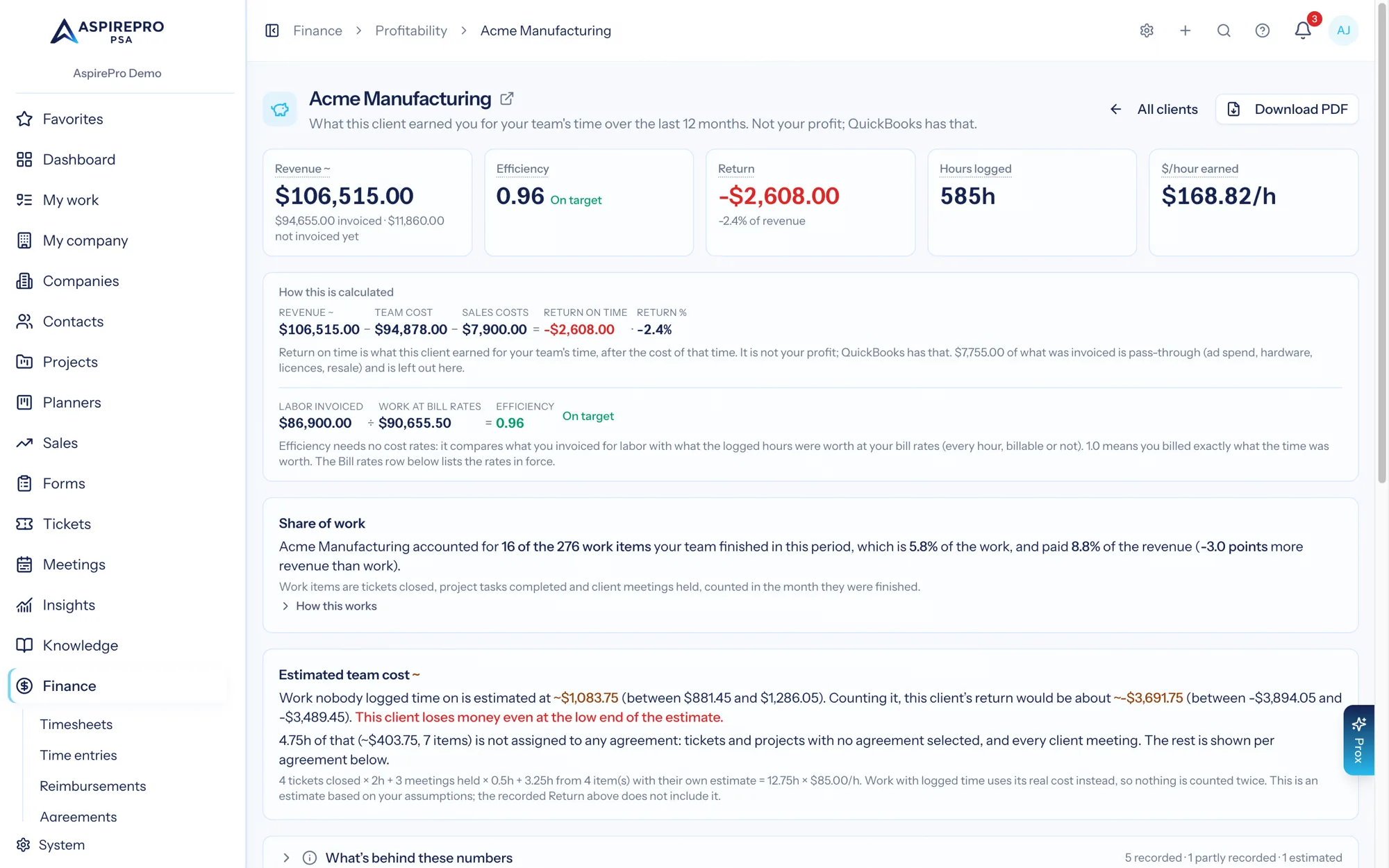
Finance → Profitability → Clients → (a client) opens a report for one account: twelve months of revenue, cost, return on time, share of work, agreements and signals in one place, with a downloadable PDF built from exactly the same numbers.
The period is fixed at the last twelve months, ending with the current month, which is still in progress. It does not follow the period selector on the list page.
What is on the page#
The header#
The client's name, with a small open-in-new-tab icon beside it that opens the company record in a new tab. Under it, one sentence: "What this client earned you for your team's time over the last 12 months. Not your profit; your accounting system has that." (it names QuickBooks or Xero once one is connected). On the right, All clients goes back to the grid and Download PDF makes the PDF and downloads it (see below).
Five KPI cards#
- Revenue (or Revenue ~ when part of it is expected) — revenue counted the way you chose; the sub-line gives the invoiced split, or names the pass-through share.
- Efficiency — labor invoiced ÷ work at bill rates, with its band word; — · $X not yet invoiced while nothing is invoiced. Efficiency →
- Return —
Revenue − Team cost, minus subcontract labor and sales costs, and minus Client expenses when that switch is on, with Return % as its sub-line. Team cost not set where no cost was recorded, with a Set cost rates → link (or "Ask an administrator"). - Hours logged — billable and not; the sub-line names hours with no cost rate.
- $/hour earned — revenue per hour logged.
How this is calculated#
One line under the cards, with this client's real numbers: Revenue − Team cost = Return on time, with a − Contractors term when subcontract labor was recorded, a − Client expenses term when the switch is on and a − Sales costs term when there are commissions or referral fees, and Return % beside it. Under that, one sentence: return on time is what this client earned for your team's time, after the cost of that time (and the expenses made for the work, when counted); it is not your profit, your accounting system has that (named once QuickBooks or Xero is connected). When no cost is recorded, the sentence says there is no Return to show. A second line, Labor invoiced ÷ Work at bill rates = Efficiency, follows when the value of the work is known.
What's missing for this client#
One card, shown only when there is something to say, with one line per gap and a fix link for each:
- No costs are recorded — red (or No time with a cost rate has been logged while the switch is off). There is no Return to show; set cost rates for the team, or one assumed team rate. Set cost rates → for people who can; "Ask an administrator to set cost rates." for people who cannot.
- Hours with no cost rate — amber. The real cost is higher and the return reads better than it is. Set cost rates →
- Work not yet invoiced — amber while nothing at all is invoiced (so Efficiency has no ratio to show), muted otherwise. Names the value of the logged work at bill rates that is not on an invoice. Review unbilled time → opens the company's Finance tab.
- Hours waiting for timesheet approval — muted. These hours are in the numbers and could change. Review timesheets →
Share of work#
This client's work items in the period, its share of everything the team finished, its share of the revenue, and the gap between them as a coloured points figure — muted at or below +5, amber above +5, red above +15. Both totals are the list page's own, so this page and the grid can never print different shares for the same client. Where part of the period was built before work was counted, it says how many months were left out.
Estimated team cost ~#
Present only when a team cost rate is set; the heading carries the amber ~. When there is work to price it reads: "Work nobody logged time on is estimated at ~$X (between $low and $high). Counting it, this client's return would be about ~$Y (between $low and $high)." The two ranges come from the give-or-take percentage in Settings and disappear when that is 0. When even the high end of the estimated return is below zero, a red sentence follows: "This client loses money even at the low end of the estimate."
Two more sentences follow when they apply. When the recorded return is positive: "The recorded return of $X covers up to Nh of team time at $R/h. The estimate says the work took about Mh." When the client has agreements and some of the estimate points at none of them: "Nh of that (~$X, N items) is not assigned to any agreement: tickets and projects with no agreement selected, and every client meeting. The rest is shown per agreement below."
Under those, the full arithmetic in words — the item counts, the assumption per item, the hours items stated themselves, and the rate — ending "Work with logged time uses its real cost instead, so nothing is counted twice. This is an estimate based on your assumptions; the recorded Return above does not include it." When there is nothing to price, the card instead reads: "Nothing to estimate: every work item finished in this period already has logged time (the real cost is used instead), or nothing was finished." See Effort for the worked numbers.
What's behind these numbers#
The same panel as the tabs, but every row is scoped to this client for the twelve-month period — not the organization.
Revenue, cost and return by month#
A twelve-month combined chart: bars of revenue counted the way you chose, a cost line and a return line. Its caption reads "Cost is your team's time.", or "Cost is team cost plus client expenses." when Include client expenses in return on time is on. Months still in progress carry a * and the caption says so. With no months at all it reads "Nothing to show yet. Numbers update a few minutes after time, invoices or expenses change."
Agreements#
"How each of this client's agreements did in the period." Every agreement with figures inside the period, with its type, monthly value, revenue, return, return % (No costs recorded as a plain badge where it applies), $/hour earned and hours. Once a team cost rate is set, an Est. return ~ column is added; hover a cell for "$X recorded return − $Y estimated team cost" and the arithmetic, or the "Nothing to estimate for this agreement" reason behind a —. With no agreements it reads "No agreement figures for this client yet." Remember these will not sum to the client figures above — why.
Signals#
"Things worth a conversation about this client." The open signals for this client, with the same caveat printed beside them that the Signals tab carries: signals read finished months on invoiced revenue only — takes more than it pays the last three, the rest the last one — so a figure on a card can differ slightly from the numbers at the top of this page. With none it reads "Nothing flagged for this client."
The PDF#
Download PDF makes the PDF in the same look as your scheduled reports and downloads it — usually in a few seconds. A small window says it's being made and starts the download when it's ready; keep it open. The PDF is made for you, with your access, and isn't emailed or shared with anyone.
It is two or three US Letter pages, marked Internal:
- a title band across the top of page 1 in your organization's accent colour (System → Organization): your logo, the client's name, the period (the first day of the twelve months to today), the client's agreements and when it was made;
- six headline tiles — Revenue (or Revenue ~, with what was invoiced underneath), Team cost (and its share of revenue), Return on time (and Return %), Hours logged (and any hours still waiting for approval), Earned per hour, and Billing efficiency with its reading (Under-billed, On target or Above the hours);
- the How this is calculated strip: Revenue − Team cost (− Contractors, − Client expenses while Include client expenses in return on time is on, − Sales costs) = Return on time, with the one-sentence definition, and the Efficiency arithmetic underneath;
- the warnings, where they apply — No costs recorded (a customer-facing document is the last place a 100% return may appear), hours with no cost rate, and hours waiting for approval;
- a Revenue and team cost by month chart, on one dollar axis;
- the By month table: Month, Revenue, Collected, Team cost, Client expenses (only while the setting is on), Hours, Return, Return %, Per hour, and Tickets · items (tickets opened · work items finished), with a Total row. Its footnote defines the marks:
*= month still in progress;~= includes revenue agreements were expected to bill;n/a= revenue but no costs recorded that month, so no return % is shown;—= no revenue; Collected = cash received that month, including sales tax. Work items reads—for a month built before work was counted; - the Agreements table: Agreement, Type, Monthly value, Revenue, Return, Return %, Earned per hour, and Est. return ~ when a rate is set (
—where there is nothing to estimate); - the What's behind these numbers table — every row, its badge and its sentence, scoped to this client;
- Notes: the expected-revenue note (the invoiced and expected split), the share-of-work sentence, and the ~ Estimated team cost paragraph where a rate is set and there is work to price: the estimated cost and the return counting it, the arithmetic, then "Give or take N%: between $low and $high, which puts the return between $low and $high." when a range is set, "The recorded return covers up to Nh of team time at this rate." when the recorded return is positive, "Nh of the estimate ($X) is not assigned to any agreement." when some of it points at no agreement, and the closing note that the recorded Return above does not include it. With nothing to price the paragraph is simply left out, and the red "loses money" sentence is on the page only.
Every amount is written in full, with cents ($199,606.00), right-aligned; $0.00 is faded and a loss is red. Rows never split across pages, and the table headings repeat at the top of each page. Pages 2 onwards carry your organization, the client and the period at the top; every page has the time it was made and "Page X of Y" at the bottom.
The numbers are exactly the ones on this page, from the same calculations. If the PDF can't be printed in the report look (the printing service is busy or down), you get the plain version instead — the same numbers, a simpler page.
The Collected column appears only here. It is cash actually received in the month, by payment date, and it includes sales tax — not revenue, and not part of either way of counting revenue. It is the fastest way to see how far your collections trail your billing on an account.
Running a QBR from it#
- Check what is missing first. Read the "What's missing for this client" card and the "What's behind these numbers" panel as your client would. If team cost is not available, you are about to present revenue as return.
- Decide how revenue is counted, deliberately. Invoices plus what agreements should bill tells the contractual story; Invoices only tells the cash story. Whichever you choose, the PDF marks expected revenue with a
~. - Check the
*. If today is early in the month, the last bar is still in progress and will look wrong. - Read the agreements table for the repricing conversation — $/hour earned against a fixed fee is the number that carries it.
- Download and send. The PDF is self-contained: nothing in it needs the app to be understood.
Anyone with View profitability can open the page and the PDF; an archived company still opens, so a former client's history stays reachable. There is no separate share link. The PDF is yours alone: only you can download it, and the file is kept for the same time as report files (13 months unless an admin changed it), then deleted. Downloads are limited to fifteen a minute, which matters only if you are scripting a batch of them.
Worked example — reading one report#
Rivera Group, last twelve months to June 2026, with client expenses switched on.
The cards. Revenue $118,400 ~, Return $31,240, Return % 26.4%, Hours logged 1,412.0, $/hour earned $83.85/h.
The ~ is the first thing to notice: some of that revenue is expected, not invoiced. The tooltip on the card gives the split — $96,000 invoiced plus $22,400 expected — so roughly one dollar in five has not been billed. On a QBR that is worth knowing before the client asks.
Share of work. Rivera Group accounted for 61 of the 728 work items your team finished in this period, which is 8.4% of the work, and paid 3.1% of the revenue (+5.3 points more work than revenue). Amber. The account takes noticeably more of the team than it produces of the revenue, without quite reaching the signal limit.
The chart. Revenue is flat at the retainer plus intermittent rebuild work; the cost line climbs from March; the return line narrows. That shape, not any single number, is the conversation.
Agreements. Monthly Retainer at 23.3% return and $83.92/h; Website Rebuild at 48.5% and $121.88/h. The retainer is the thin one — and it is the one that has been in place longest.
The KPI mismatch to expect. The Return card is $31,240, and $118,400 − team cost − client expenses is what produced it, which is why the first card is labelled Revenue ~ and the "How this is calculated" line spells it out. If the organization were counting invoices only, the same client would read $96,000 revenue and a very different return. The label always tells you which one you are looking at — check it before quoting a number in a meeting.
Before the first QBR you send, generate one PDF for a client you know well and read the "What's behind these numbers" table as if you were them. It is the fastest way to find out which of your inputs is not yet worth showing.