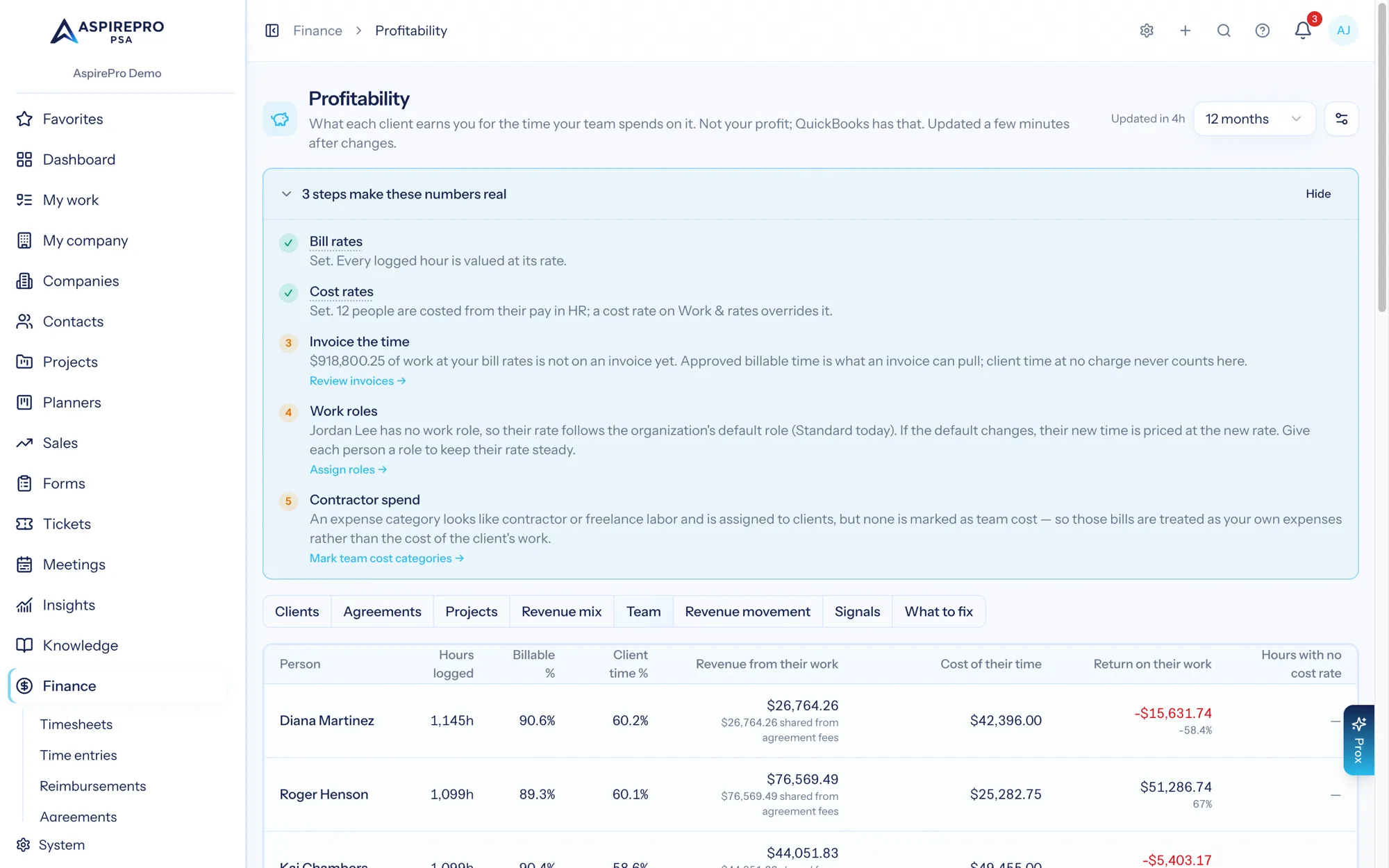
Finance → Profitability → Team shows how each seat translates into delivery: the hours a person logged against client work, how much of it was billable, the revenue that work brought in, what it cost, the return on it, and how many of those hours carried no cost rate at all.
What is on the tab#
Column | What it is |
|---|---|
Person | The person. Someone who has left reads Former member — their history stays. |
Hours logged | Hours logged in the period, across every client. Billable and non-billable together. |
Billable % |
|
Client time % | Of everything the person logged in the period, internal work included, the share that was on clients (billable or no charge). Counted live from their time entries. |
Revenue from their work | The invoice lines that billed their hours, plus their share of agreement fees by the value of their work (shown underneath). Product and other lines aren't anyone's revenue. |
Cost of their time | The sum of each entry's hours × the cost rate recorded on it, plus, for people who may see pay, what they earned from agreements (see Pay from agreements on this tab). An owner's time reads Owner — time at replacement rate. |
Return on their work | Revenue from their work minus the cost of their time, with the percentage when a cost was recorded. A Role rate — estimate note means their pay isn't set, so their hours are costed at their role's rate. For someone paid a share, an Earned $X/h line sits underneath. |
Hours with no cost rate | Hours logged with no cost rate on the entry, shown as an amber badge. These hours are real work that added nothing to any return figure. |
Below the table, an Hours by month matrix gives each person's logged hours per month across the period, with a — for a month they logged nothing.
Rows are sorted by hours. Only time that reached a client appears here. Time logged on a ticket, a project, a project task or a client meeting resolves to that company and counts; time logged against a planner task, a work category or a meeting with no company, or as a kind of work set to Internal (such as Sales), resolves to no client and is reported as internal in the "What's behind these numbers" panel instead. See Costs. With no rows at all, the tab reads "No team figures for this period yet. Numbers update a few minutes after time, invoices or expenses change."
How a person's revenue is counted#
A person is credited only with revenue that can be traced to their hours:
- Invoice lines that billed their time. A time line's amount goes to the person whose hours it bills. When one line bills several people, it is split by their minutes, so the line still counts once.
- Their share of agreement fees, shown underneath as $X shared from agreement fees. A retainer's fee is shared across the people who did that month's work on the agreement, by the value of their work, the same way it is shared across projects (see How an agreement fee is shared). With Share agreement fees across projects and people set to Don't share, nobody gets a share.
Product lines and manual lines are nobody's revenue. A client's and an agreement's revenue are still the invoice totals; a person's figure is a view of the same money, never counted a second time.
For revenue per hour on a client or a contract, use $/hour earned on the Clients and Agreements tabs.
Pay from agreements on this tab#
What a person earns from agreements (see Pay rules) shows here only to people who may see pay (View payouts). Everyone else sees a note that it is hidden, and costs are each person's hours at their cost rate.
- Cost of their time includes it: incl. $X from payouts, or incl. $X team pay (paid) when your organization counts team pay when it's paid. Team pay, commissions and referral fees all count here. When it counts is set by Count team pay from agreements; see Pay from agreements.
- Pay earned vs paid. While pay runs are on, Pay $X earned · $Y paid so far shows what the person earned in the period beside what pay runs have paid for it.
- Earned per hour. For someone paid a share, Earned $X/h is their team pay ÷ the hours they logged on the agreements that pay it. Set Target earned per hour in the Profitability settings and the target shows beside it.
Why it has its own permission#
The tab is gated by View member economics (finance.profitability.members), separately from View profitability. It is compensation-adjacent: cost of their time divided by hours is a person's cost rate, and a cost rate is close enough to a salary to be treated as one.
Three consequences:
- It is admin-tier by default and is not implied by Manage finance. Someone who can do everything else in Finance still does not see this tab unless it is granted explicitly.
- Without the grant the tab is not rendered in the tab bar at all, and visiting its URL directly returns 403.
- It requires View profitability, which in turn requires Access finance.
Worked example — one person's month#
Dana Okoye, June 2026, across every client.
hours logged        152.0
hours billable      118.0
billable %          118.0 ÷ 152.0 = 77.6%
cost of their time  152.0 h × $65.00 = $9,880.00
hours with no cost rate   0.0
Sixty-two of those 152 hours were on Rivera Group, contributing $4,030.00 of the $6,437.00 team cost in the reference month. The other 90 hours are on other clients and appear in their return.
The 77.6% is worth reading with care. It is billable hours over logged hours on client work — it is not utilization against capacity, which is what the Resource Center measures against a person's working schedule. Someone at 77.6% here who logged only 60 hours all month has a utilization problem this tab cannot see.
Worked example — a person with no cost rate#
Priya Shah, June 2026.
hours logged        84.0
hours billable      61.0
billable %          61.0 ÷ 84.0 = 72.6%
cost of their time  $0.00
hours with no cost rate   84.0   ← amber badge
Priya has no user rate, no pay in HR, and her work role has no cost rate either, so every entry she saved was stored with no cost rate. Her 84 hours are real client work that costs every one of those clients nothing on this page. Rivera alone is 18.0 of them, worth roughly $1,080.00 of hidden cost and 10.9 points of return on that one account.
The fix is one field: a cost rate on her work role under System → Work & rates, a per-person rate override, or her pay in HR. Rates are stored on each time entry as it is saved, so a new rate doesn't reach June's entries on its own. While June is this month or last, Apply current rates on Work & rates fills in their empty cost rates and rebuilds the month; once June is older than that, it stays without a cost rate and only the hours logged since are costed.
An amber badge in this column is the highest-value thing on the whole Profitability section. Every hour in it is making a client's return read better than it is, somewhere.