System → Work & rates defines the work roles and rates that several modules rely on. Setting these up gives time tracking, resource planning, and billing a shared, consistent foundation.
The page has four tabs: Roles & rates (each role's bill rate and cost rate), Work types (standard, after hours, emergency — and their multipliers), How rates are calculated (multiplier or matrix, and the default role and type), and People (where each person's rates come from today, and personal rates). Every term with a dotted underline — Bill rate, Cost rate, Default role, Multiplier — explains itself on hover, here and on Finance → Profitability, so nobody has to know the vocabulary before reading the page.
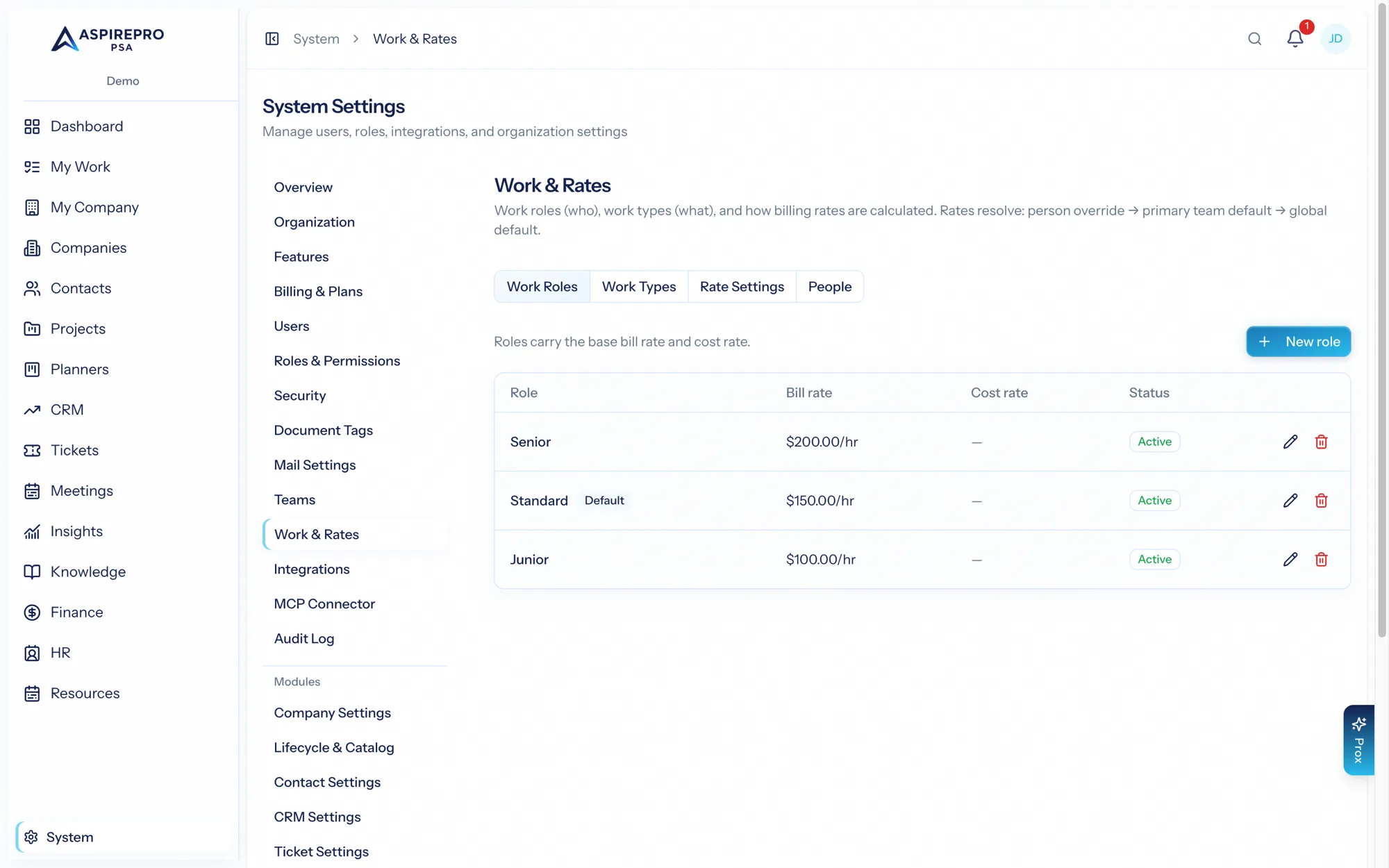
Work roles#
A work role describes the kind of work someone is doing when they log time — "Consultant," "Developer," "Project manager," "Support engineer." Work roles matter because the same person may do different kinds of work at different rates, and reporting is far more useful when time is attributed to a role rather than just a name.
Rates#
Every work role carries two rates, and they answer different questions.
- Bill rate — what an hour of that work sells for. It prices billable time onto invoices and drives estimated and logged fees in resource planning.
- Cost rate — what an hour of that work costs you. It is the fully-loaded hourly cost of the person doing it, and it is the only thing that turns delivered hours into a labour cost.
Rates flow into:
- Timesheets — time is captured against work roles, and both rates are resolved and stored on the entry as it is saved.
- Agreements and invoices (Finance) — billable time is priced using the applicable bill rate.
- Resource planning — estimating the cost and value of allocated work.
- Profitability — cost rates are what make a client margin a margin.
Agreements can also carry their own work-role rates, letting you honor client-specific pricing where it differs from your standard rates.
A role's Default badge and the Default work role setting are one thing: the role a person's time is priced at when neither they nor their primary team has one. Switching Default on a role sets it; picking it under How rates are calculated moves the badge. A cost rate that is not set reads Not set in amber on both the role and the person, because hours in that role add nothing to Team cost until it is.
On the People tab, saving a personal rate creates a new dated rate for that person. A rate you leave blank keeps its current value — a raise on the bill side never blanks the cost side, and vice versa.
Cost rates, and why they matter more than they look#
A cost rate resolves in three steps: a person's own effective-dated rate override here, then their pay in HR turned into a loaded hourly cost, then the work role's cost rate. HR pay sits above the role on purpose: a role's cost rate is an average across everyone in the role, while HR pay is that person. There is no team default and no organization default for cost — if none of the three is set, the hour is saved with no cost rate at all.
The People tab says where each person's cost comes from today — personal rate, from HR pay or from role. A cost from HR pay is shown as a figure only to people who may also see compensation (for a contractor, the cost is the pay); everyone else sees Set (hidden), and every calculation uses it either way. Entering a cost rate for a person here overrides their HR pay.
The consequences are worth stating plainly, because they are the most common reason Profitability looks wrong:
- Hours with no cost rate are counted as uncosted hours. They are real delivered work that adds nothing to any client's labour cost, so every margin they touch reads optimistic.
- When no hour in a window carries a cost rate and no client expense is tagged, Profitability withholds the margin percentage entirely, showing Cost not measured rather than a flattering 100%.
- Rates are stored on each time entry when it is saved, not looked up later. Setting a cost rate today prices tomorrow's hours; it does not restate hours already logged. That is deliberate — a closed month can never move under a decision made after it — but it does mean the sooner these are set, the less history is uncosted.
Cost rates sit behind their own permission, since an hourly cost is compensation-adjacent. The Uncosted hours card on Finance → Profitability → Data Quality counts exactly how many hours are currently missing one.
Applying rates to time already logged#
A time entry copies its bill and cost rate the moment it is logged, so a rate you set today never reaches the hours logged before it existed — and most organizations log time first and set rates second. When time logged this month or last carries no rate, an amber banner at the top of this page says how many entries and offers Apply current rates. That fills the empty snapshots only: nothing already set is changed, invoiced time keeps the bill rate it was billed at, and the two months are rebuilt on Finance → Profitability straight away. It needs the same permission that may see cost rates, and it is audited as one summary entry.
Resource capacity#
Closely related is System → Resource capacity, where you set how much capacity your team has for resource planning. Together, work roles, rates, and capacity give the Resource Management and Finance modules what they need to plan, price, and bill work accurately.
Set work roles and both rates before your team starts logging billable time — it's much easier than re-attributing historical time later, and a cost rate added afterwards never reaches the hours already logged. You can still override rates per agreement for specific clients.
These settings feed the Finance and Resource Management modules; see their documentation for how timesheets, agreements, invoices, and allocations use them.