A pay rule (a payout) says who is paid from a piece of client work, and how. A consultant on an hourly rate for one client, a partner taking 20% of a retainer's fee, a referral partner paid $500 a month, a salesperson's commission when a deal is won: each is one payout.
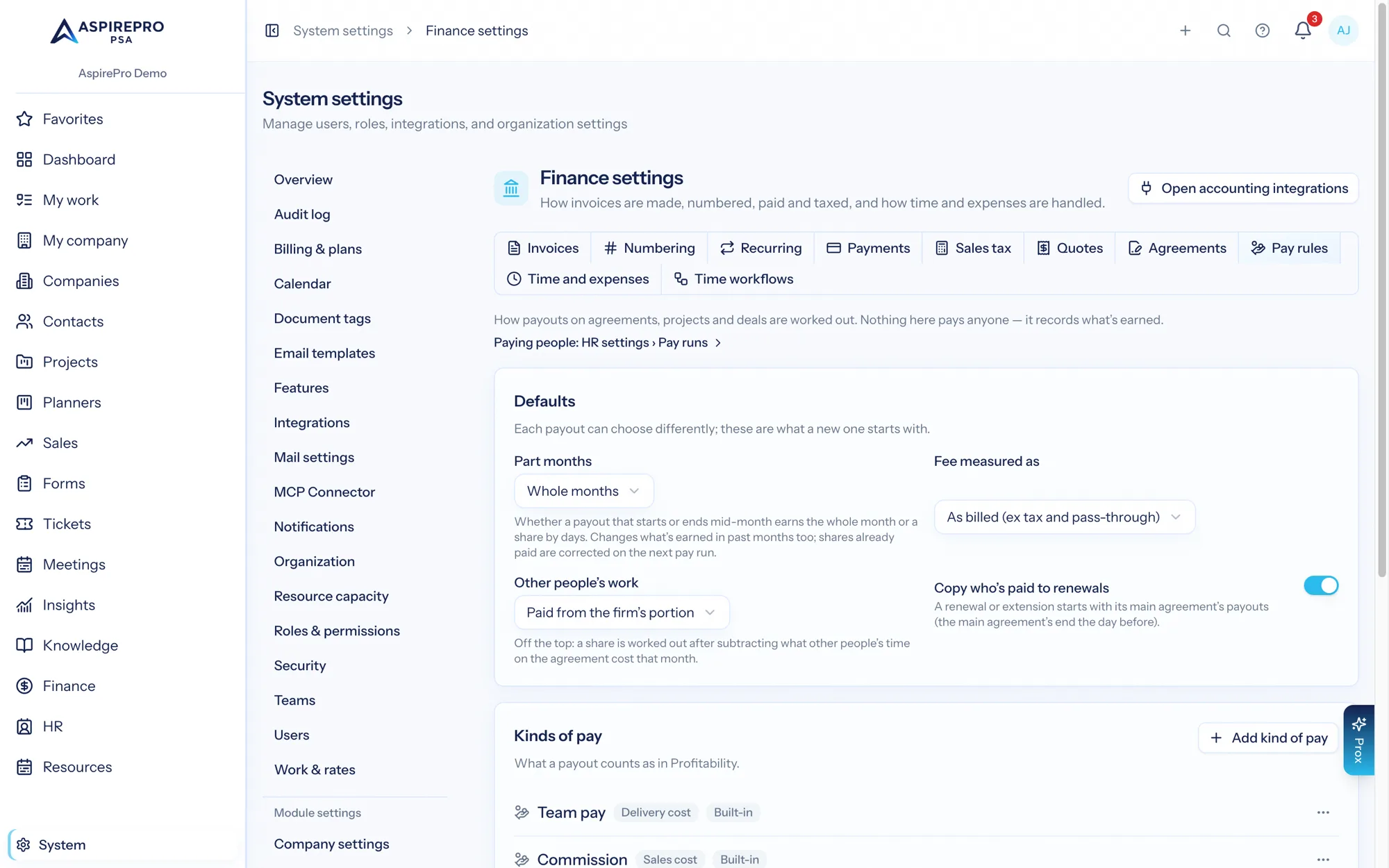
Pay rules record what's earned. They don't pay anyone. Nothing here sends money, creates a bill or touches payroll. (When pay runs are switched on, each payday reads these rules to work out what people are owed, but the pay run is where that happens.) What they do today:
- the cost of a person's time uses their hourly pay rule, so Profitability shows what the client really costs you;
- each payout shows an estimate of what it earns per month;
- each person can see their own pay on their HR page, if you choose to show it to them (see My pay).
Where payouts live#
- Agreements — the Who's paid tab on an agreement.
- Projects — the Who's paid section on the project's Rates & pay tab. Projects take hourly, fixed and one-off payouts; a percentage of a project's invoices isn't offered yet, because invoice lines don't record which project they're for.
- Deals — the Who's paid tab on a deal: a fixed amount or a percentage of the deal, earned when the deal is won.
- Finance → Payees — everyone you pay, with how many payouts each has running.
Payees: people without a login#
A payout pays a payee. Someone on your team is picked straight from the team list. Anyone else — a referral partner, a freelancer, a partner business — is added as a payee with just a name (and an email if you like). Payees don't need a login and never take a seat.
You can archive a payee once their payouts have ended. Archiving keeps their history.
The four ways to pay#
How | What it means | Example |
|---|---|---|
An hourly rate for their time | Their time on this agreement or project costs this rate. | Sam is paid $85/h for time on the Northwind retainer. |
A share of the fee | A percentage of what the client is billed (agreements only). | A partner takes 20% of the monthly fee. |
A fixed amount | The same amount every month (or each time the agreement bills). | Dana, a referral partner, gets $500 a month. |
A one-off amount | Paid once: when the agreement starts, on its first payment, or on a date. | A $1,000 signing bonus when the agreement starts. |
On a deal, a payout is either a fixed amount when won or a percentage of the deal — of its value, or of its annual value (a $5,000-a-month deal has an annual value of $60,000).
Kinds of pay#
Each payout has a kind of pay: Team pay, Commission, Referral fee, Owner distribution, or kinds you add yourself in System → Finance settings → Pay rules. The kind decides where the payout counts in Profitability: as a delivery cost (paying for the work), a sales cost (paying for winning it) or an owner distribution (paying the owners, not a cost of the work).
Shares of the fee: the order they're worked out#
When an agreement has several percentage payouts, they're worked out in a fixed order, so nobody's share depends on the order they were added:
- Of the fee — a percentage of the fee itself.
- Fixed amounts are taken out next.
- Of the fee after fixed payouts — a percentage of what's left once the fixed amounts are out.
- Of what's left after earlier payouts — a percentage of whatever remains, in the order you set.
Example. A $10,000-a-month retainer has: a partner on 10% of the fee, a referral partner on $500 a month, and the delivery lead on 50% of the fee after fixed payouts.
- Partner: 10% of $10,000 = $1,000.
- Referral partner: $500.
- Delivery lead: 50% of ($10,000 − $1,000 − $500) = $4,250.
If the shares on one agreement add up to more than 100%, AspirePro warns you and asks you to confirm before saving.
What "the fee" means#
Fee measured as decides which money a share is worked out from:
- As billed (ex tax and pass-through) — the default. What you invoiced for the work, without sales tax and without costs you only passed through (expenses billed back at cost).
- As collected, after card fees — what actually arrived, less card processing fees.
Product sales, one-time charges and hours billed past the ones a retainer includes only count when the payout ticks them (under Advanced when adding a payout).
Other people's work#
When others work on the agreement too, Other people's work decides who pays for their time:
- Paid from the firm's portion (the default) — shares are worked out on the whole fee; the firm pays for everyone else's time out of what's left.
- Taken off the top before shares — the cost of other people's time that month is subtracted first, and shares are worked out on what's left.
Limits and dates#
- Ends: with the agreement, on a date, or after a number of months.
- Up to a total of: a cap on what the payout can ever earn.
Both follow the payout across its changes, and across renewals that copy it: a 12-month referral fee that's changed in month 4 still stops after 12 months in all, and a $10,000 cap counts everything earned before the change.
A payout can't start before its agreement does, or run past the agreement's end.
Part months#
A payout that starts or ends partway through a month either earns the whole month (the default) or a share by days — say 10 days of a 30-day month earns a third. Choose in System → Finance settings → Pay rules → Part months. Changing it changes what's earned in past months too, so past months' figures can move.
Changing, ending and deleting#
Payouts are dated, like rates: you never overwrite what was true before.
- Change from a date… — the new terms start on that date; before it, the payout stays as it was.
- End… — stops it from a date. What it earned before stays.
- Hand over… — gives a share or fixed amount to someone else from a date, for example when someone leaves and their replacement takes over the client. Their share ends the day before. The new person gets the same terms from that date, or the percent or amount you set. Nothing is paid twice or missed. In Finance → Payees, Hand over all shares… does this for everything one person has running.
- Delete — only for a payout that hasn't earned anything yet. Once it has, end it instead.
When you change or end an hourly payout, AspirePro re-costs that person's time from the date it takes effect. Only the cost changes (never what the client is billed), and only on time the payout prices. A cost that came from someone's HR pay or work role is left alone.
Renewals and child agreements#
When you create a renewal or extension, it starts with a copy of its main agreement's payouts (from the day the main agreement ends), unless you untick Copy who's paid from the main agreement. Turn the default off in System → Finance settings → Pay rules → Copy who's paid to renewals. A copied payout keeps counting toward the original's month limit and cap.
On any child agreement, Copy from main agreement (in the ⋯ menu) copies the main agreement's payouts at any time.
When a child agreement carries its main agreement's fee while it's live, payouts on the main agreement earn nothing then. The Who's paid tab says so, and links to the child to copy them there.
Deal payouts#
A deal payout is earned when the deal is won, at the deal's value at that moment, and dated the day it was won. If the deal is later lost or reopened, the earned amount is reversed. Win it again and it's earned again.
Moving a deal into a won stage is what counts. Changing a stage's won setting in a pipeline doesn't win or un-win the deals already in it, so it doesn't earn or reverse anything: fix those by hand.
What this pays per month#
Each agreement's Who's paid tab estimates what its payouts earn in each of the next six months. When the fee comes from the agreement's schedule, it says Estimate from the schedule; when it depends on what's invoiced (time and materials, say), it says Depends on what's invoiced.
My pay#
Each person can see their own payouts on their HR page under My pay: how each one works, in a sentence, and an estimate per month. It never shows anyone else's pay. A share that depends on other payouts says so ("of the fee after fixed payouts") without showing their amounts.
My pay only appears when Let people see their own compensation is on in HR settings. It's off unless you switch it on.
Who can see and change payouts#
- View payouts — see who's paid and how much. Payouts are sensitive: people without it don't see the Who's paid tabs, the Payees list, or payout costs on time entries.
- Manage payouts — add, change and end payouts, payees and kinds of pay.
- Manage HR includes both.
Agreement payouts also need access to the agreement. Every change is recorded in the audit log under Pay, and the payee is notified when one of their payouts changes.
Pay rules settings#
System → Finance settings → Pay rules (a tab of Finance settings) holds the defaults a new payout starts with — fee measured as, other people's work, copy on renewals, part months — and your kinds of pay. You need Manage payouts (included with Manage HR); people who have it but not Finance settings see only this tab. A kind's counts as is locked once a payout uses it (or for the built-in kinds): switch it off and add a new one instead.
Prox and AI assistants#
Prox and connected AI assistants can add, change and end payouts and payees (manage_payouts), with the same permissions and audit trail as the screens.