Time is only half of what a job costs a client. The drive you fitted, the licence you bought, the after-hours callout — those are charges, and they belong on the job that incurred them.
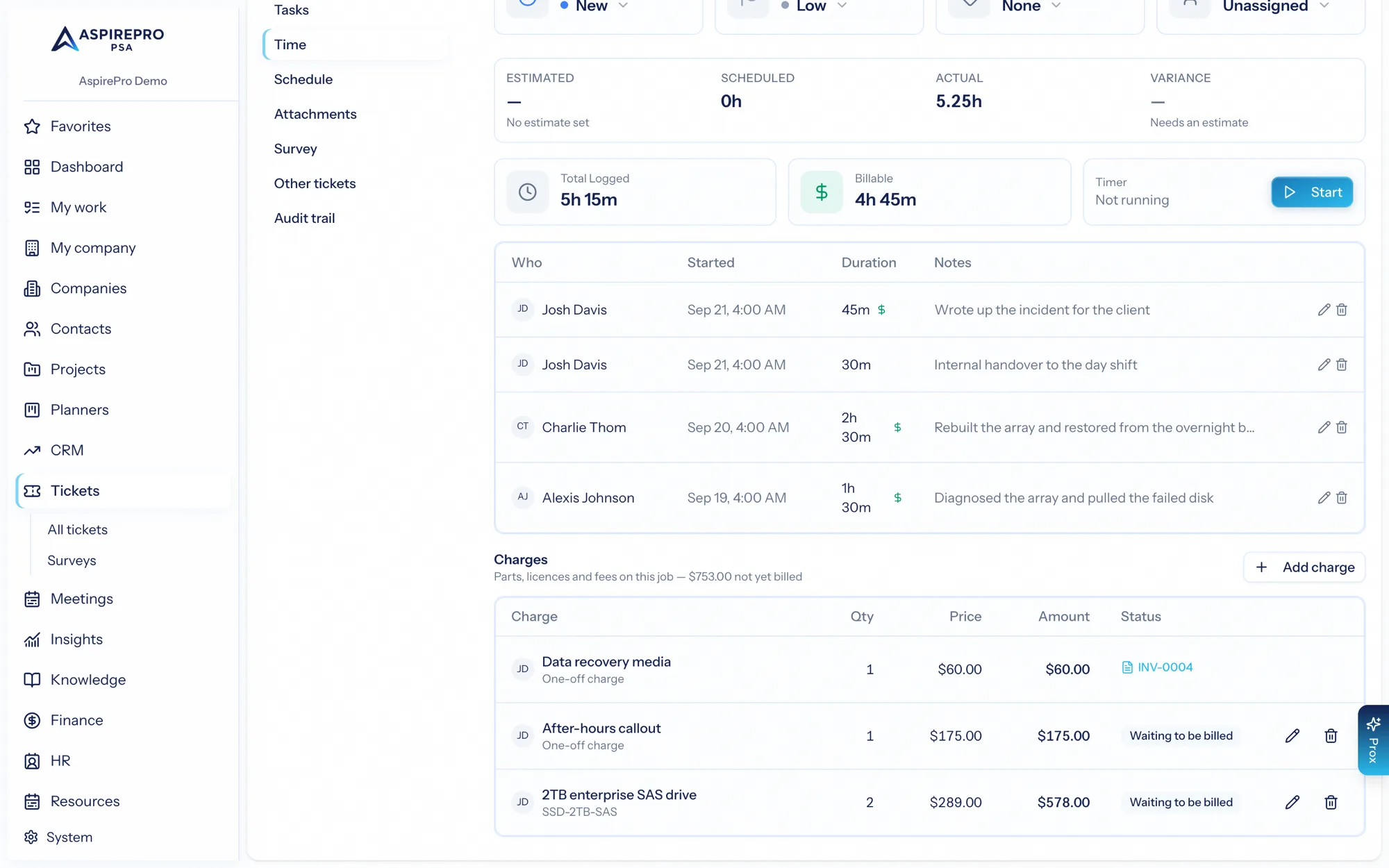
Anyone who can edit the work can record one. You do not need a Finance permission, because the person who fitted the drive is the person who knows a drive was fitted. Deciding to actually bill it stays with Finance, on the invoice.
Where they live#
On a ticket or a project, open the Time tab. Underneath the time entries is Charges, with a running total of what is not yet billed.
Charges only appear where there is a client to bill and your organization has Invoices switched on.
Adding a charge#
Add charge opens a short form.
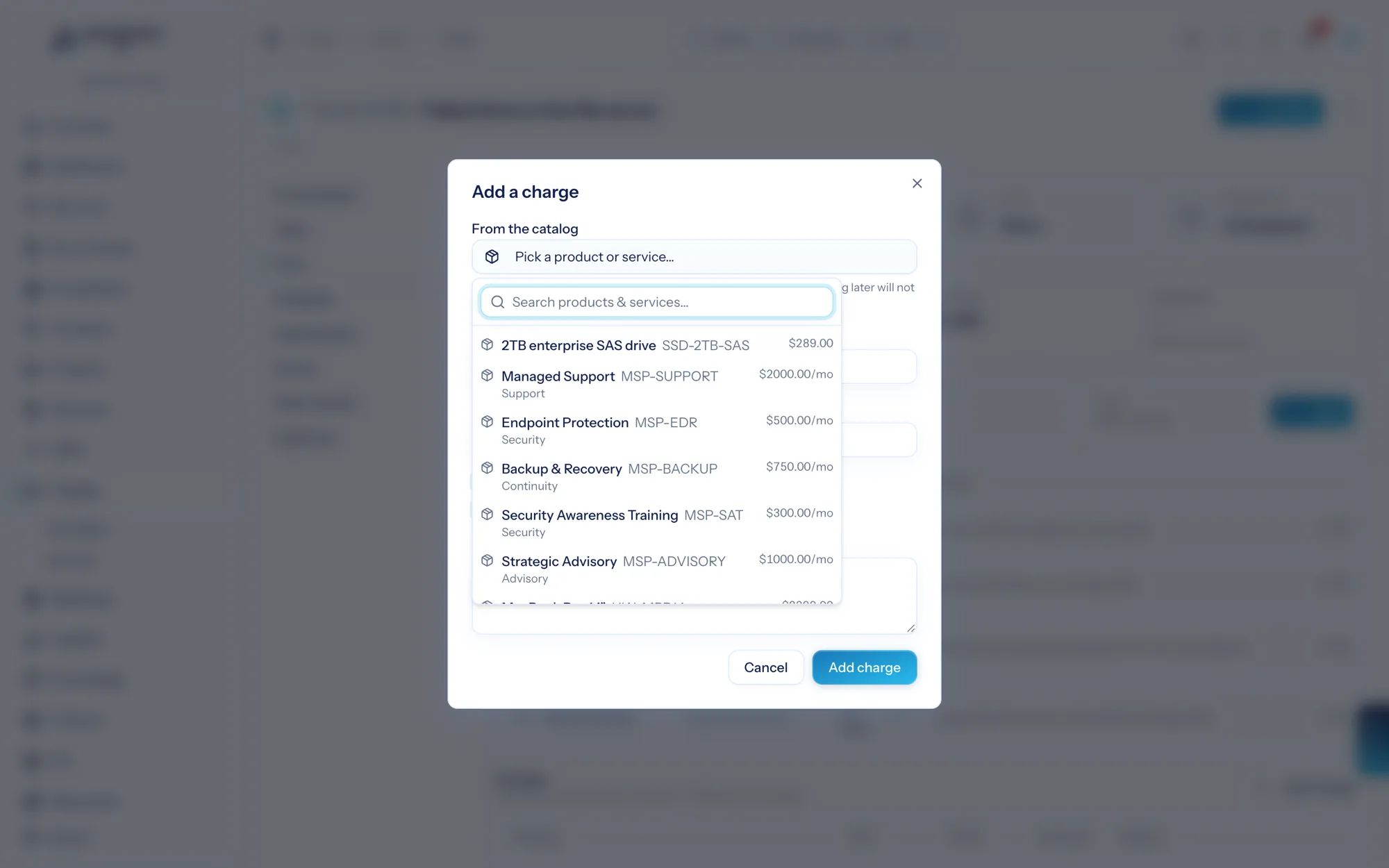
- From the catalog — pick a product or service and its name and price are copied across. You can change either before saving.
- Or write your own — leave the catalog alone and type a description and price. A one-off part bought for this job, a flat fee, anything. The catalog is where repeatable things live, not a gate on being able to bill something.
- Quantity and price each — the amount is worked out for you.
- Bill this to the client — on by default. Turn it off to record something on the job that must never reach an invoice, like a part swapped under warranty. It still shows on the job, marked Not billable.
- Taxable — whether this line attracts tax on the invoice.
- Note — anything the person raising the invoice should know.
Prices are a snapshot#
The price is copied when you add the charge, and nothing ever re-reads the catalog afterwards. If you reprice that drive next month, this charge — and the invoice it ends up on — still says what the client was told at the time. The same rule quotes and invoice lines already follow.
Taking it out of stock#
If the charge is a stocked item and you hold the Purchasing & Inventory permission, you will also see take it out of stock now. Tick it and the delivery to the client and the charge are recorded together, so the shelf and the bill can never disagree.
Three things to know:
- If the shelf does not hold that many, nothing is recorded — no charge, and no delivery. Fix the stock figure, or untick the box and record the charge on its own.
- Without the Purchasing & Inventory permission the whole charge is refused rather than quietly recorded without the stock move. Ask someone who has it, or record the charge and let them move the stock separately.
- Serial-tracked hardware is charged here but handed over in Purchasing, where you pick the exact units and each one becomes a Pro Card on the client. Charging for it here works normally; only the stock movement lives elsewhere.
Removing a charge#
Remove a charge and it comes off the job. It does not un-ship anything: if the hardware was taken out of stock and handed over, the client still has it. Putting stock back is a purchasing action.
A charge that is already on an invoice cannot be edited or removed here at all. The invoice line is the record from that point on, and the row tells you which invoice took it — follow the link and edit it there, or remove it from the invoice to send the charge back to waiting.
Getting them billed#
Unbilled charges wait in the client's pool alongside unbilled time. There are three ways to bill them:
- Quick invoice from the job itself — the fastest route when you are already looking at the work.
- Pull charges in the invoice editor, beside Pull time and Pull expenses.
- The client's Finance tab, which lists every unbilled charge across all their tickets and projects and counts them in work in progress.
Whichever route you take, a charge can only reach one invoice. The moment it lands on one it disappears from everywhere else, so two people billing at once cannot charge the client twice for the same drive.
Charges and expenses are different things#
Both end up as invoice lines, and it is worth keeping them straight:
- A charge is something the client is being sold — a part, a licence, a fee.
- An expense is money one of your people spent out of pocket and is owed back, which you may also pass through to the client at cost plus a markup.