HR settings live under System → HR Settings (they need HR management permission). This page also explains the visibility model — how HR keeps sensitive data private.
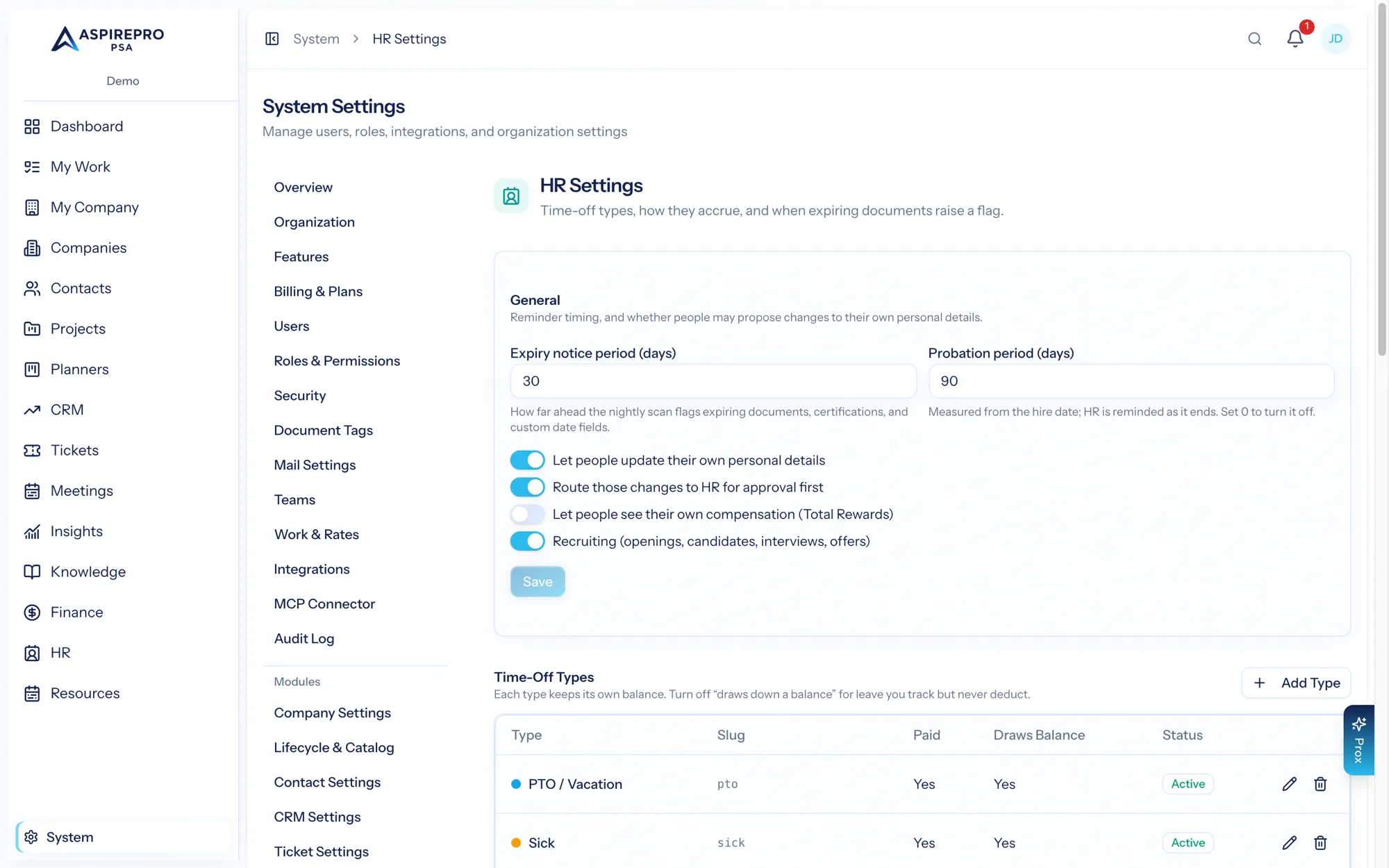
HR settings#
System → HR Settings configures:
- General — self-service editing on/off and whether it requires approval, probation period, whether people can see their own compensation ("total rewards"), the certification/expiry notice window, and the recruiting sub-toggle.
- Cost to the business — what an employee costs on top of their pay, used to turn HR pay into a cost rate for anyone without one on Work & rates: employer payroll tax (default 7.65%), working hours per year (default 2,080), and benefits and other costs per employee per year (default none). Contractors get none of these unless their own cost details add something. How it's used →
- Time-off types — the kinds of leave (vacation, sick, personal…), each with a color and whether it's paid and counts against balance. Types in use are deactivated rather than deleted.
- Accrual policies — how each type accrues: the method, annual days, carryover limits, waiting periods, and reset timing. Assign policies to people and run accruals on demand.
- Custom profile fields — add your own fields to employee profiles, in the section you choose, with a type, help text, and a secret flag for sensitive fields. Fields with answers are deactivated rather than deleted.
The visibility model#
HR holds your most sensitive data, and its access model is deliberately strict — worth understanding clearly:
- No admin override. There's no permission that reveals everyone's HR data wholesale. Access to a person's profile comes from one of three things: the Access HR permission, being that person (your own profile), or being their manager.
- Compensation needs its own compensation-view permission — or it can be your own pay, if the "show own compensation" option is on. You never see anyone else's pay without the permission.
- Cases are HR-management only, and — importantly — the person a case is about never sees their own cases.
- Surveys are structurally anonymous, and 1:1 private notes are never visible to the other participant. These protections are built into the data model, not just enforced by policy.
- Self-service lets people propose changes to their own personal data (never employment or compensation) — see Change requests.
This layered model means HR can do its job, managers can support their teams, and everyone can manage their own information — without anyone seeing more than they should.
The single most important thing to know about HR access: it is relationship- and permission-based, with no blanket admin bypass. Grant the HR permissions deliberately, and the module keeps sensitive data appropriately private by default.