Products & Services is your organization's price list: one catalog holding every product and service you sell. Agreements, quotes and invoices price their lines from it, and client coverage is measured against it. Find it under System → Products & services.
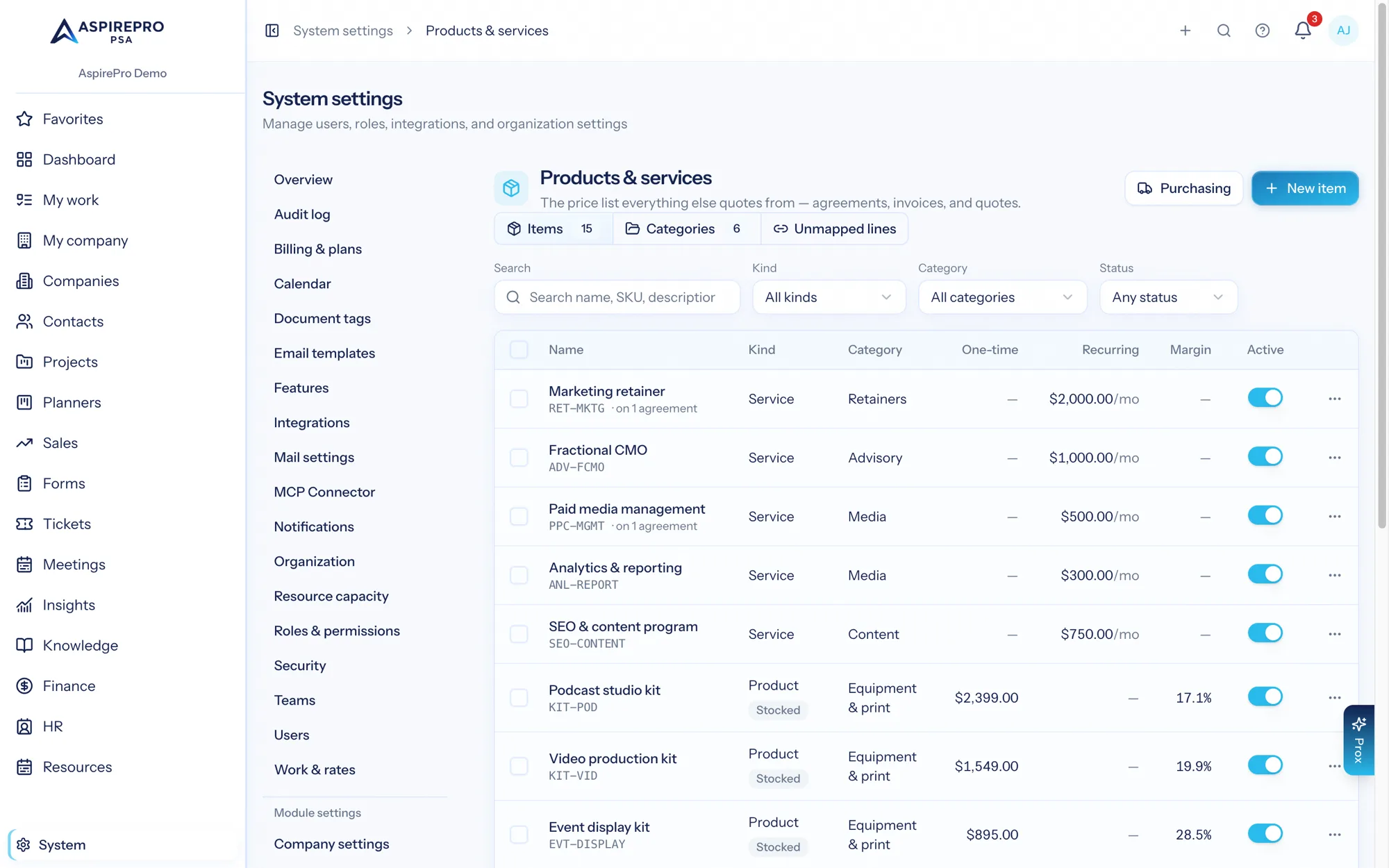
Items#
Every catalog entry is an item with a kind that says how it behaves:
- Service — labor or a deliverable. Give it a one-time price, a recurring price (monthly, quarterly, every 6 months, or yearly), or both. A fractional role or a monthly program is a service with a recurring price; there's no separate kind for it.
- Product — goods you sell, without stock tracking.
- Product (stocked) — goods whose quantity you track. See Stock on hand.
- Bundle — several items sold together at one price, like a package. See Bundles.
The kind is AspirePro's own, so it doesn't have to match your accounting system word for word. "Recurring" is about how often you bill, which QuickBooks and Xero handle with their own scheduled invoices rather than a kind of item — so here's what each becomes when it's added there:
Kind here | QuickBooks | Xero |
|---|---|---|
Service, Bundle | Service item | Item |
Product, Product (stocked) | Non-inventory item | Item |
In Stripe, every item becomes a product; one with a recurring price gets a price that repeats at its cadence (monthly, every 3 or 6 months, yearly), and otherwise a one-time price.
How often a client is billed lives on their agreement or recurring invoice in AspirePro, not on the item.
An item can carry both a one-time price and a recurring price — a website with a hosting setup fee and a monthly management charge is one item, not two. When you record cost alongside price, the list shows the margin at a glance.
Each item can also carry a SKU (capped at 30 characters — the limit that stays portable to accounting integrations), a customer-facing description that's copied onto document lines, staff-only internal notes, a unit label ("hour", "seat", "device"), a taxable flag, and a default vendor with their SKU — the vendor is just a company on your Companies list.
Counts in Profitability as tells Profitability what kind of money the item brings in, so it can measure how well your team's hours pay. Labor is money your team earns by doing the work — consulting, a fractional role, a website build. Product (resold with a margin) is something you resell and keep a margin on, like a software licence or hardware: while Count product sales as revenue with a margin is on in the Profitability settings (the default), the sale counts as revenue and its cost comes off Return. Pass-through (resold at cost) is money you collect and pass on — ad spend, a media buy, hosting at cost. Products and pass-through are both left out of Efficiency and $/hour earned; otherwise reselling a $10,000 licence would make your team look ten times as productive. Pass-through is also left out of Return while client expenses are switched off. The field starts on Default for this kind: Labor for a service, Product for a product or a bundle with a product inside. Change it only for an exception, like a resold software seat that's set up as a service.
Prices are snapshots#
When an item is added to an agreement, quote or invoice, the document copies the description and price at that moment. Editing the catalog later never rewrites documents you've already issued — the catalog is where prices start, not where history lives.
The same principle protects deletion: an item that agreement lines are mapped to can't be deleted, because every coverage percentage already calculated from it would silently change. Deactivate it instead — it disappears from pickers but existing documents keep their lines.
Categories#
One level of grouping, managed on the Categories tab — folders for what you sell ("Fractional leadership", "Websites", "Billing items"). They help you find things (the list filters by category, and pickers show it under each item's name) and see patterns: the Services sold by client widget in Insights can be narrowed to one category, so "who buys from Websites but nothing from Marketing?" is one filter.
Categories never affect billing and stay in AspirePro: they aren't sent to QuickBooks, Xero or Stripe, and QuickBooks' own categories aren't brought in. How an item lands in your books is decided by its income account in your accounting system, which your bookkeeper controls — so you can organize and rename categories freely (a category's ⋯ menu → Rename).
Deleting a category never touches its items — they just become uncategorized.
Serialized hardware and Pro Cards#
A product can be marked serialized and pointed at a Pro Card template. That link is how sold hardware becomes a tracked client asset: deliver a laptop, and a Pro Card of that template (a "Workstation", say) is created on the client's record with the serial number filled in — no double entry, and a year later the serial is right there when the client calls about it.
Bundles#
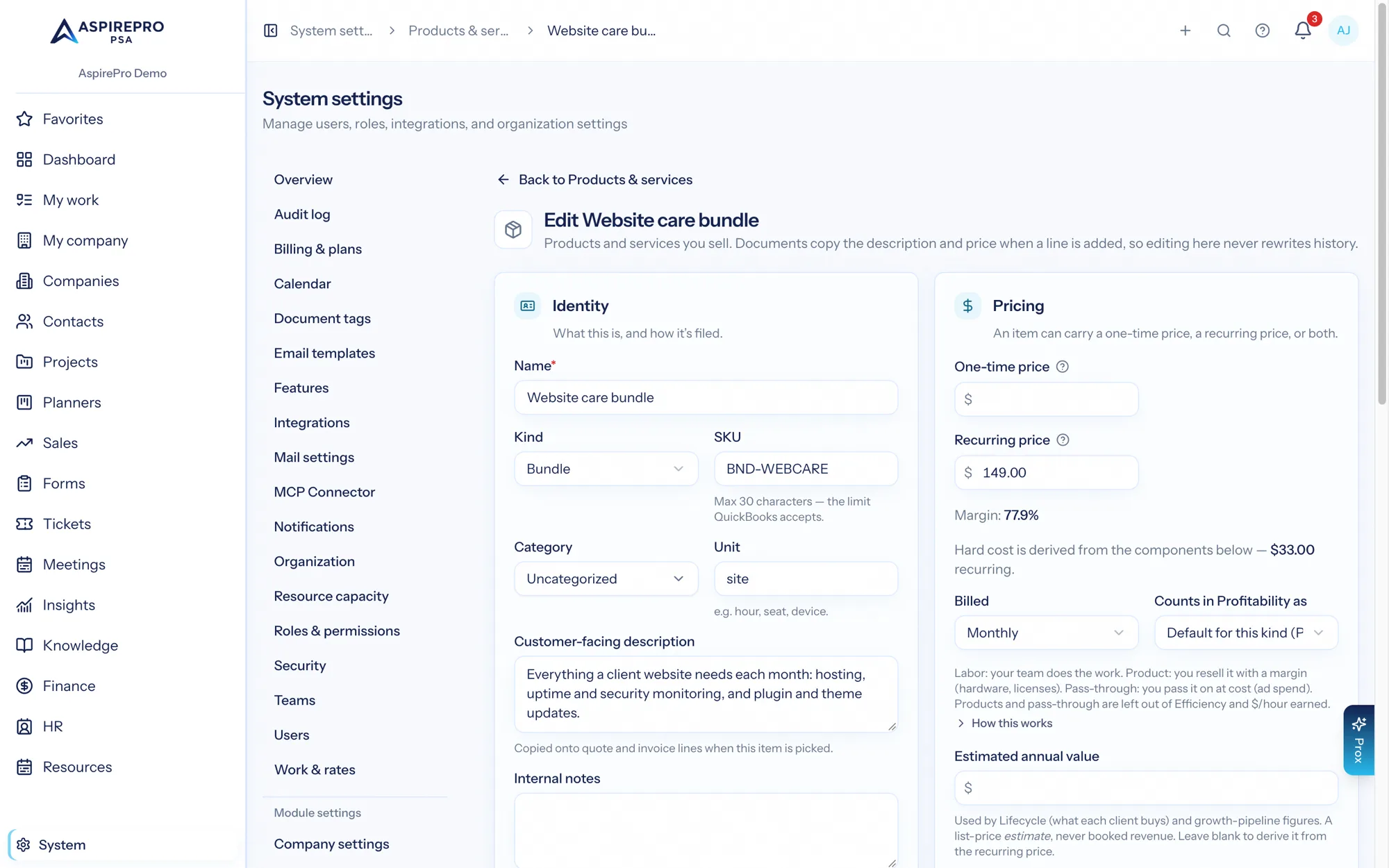
A bundle is an offering composed of other catalog items — "Website Care Plan" made of hosting, monthly updates, backups, and two support hours. You set the bundle's sell price; its hard cost is derived from the components (cost × quantity, per pricing side), so repricing a component anywhere instantly reprices every bundle's margin. If any component has no cost, no margin is shown at all — a margin built on holes would end up quoted.
Bundles never nest, and on documents a bundle lands as one line at the bundle price — the client sees the offering, never the parts. On an agreement, the parts are also copied under that line (included, no price of their own) so the client's Lifecycle counts each one — see Agreements → Services. When a bundle syncs to an accounting or CRM system it travels as a plain item at its sell price; the composition stays in AspirePro.
Using catalog items on jobs, quotes, invoices and agreements#
Tickets and projects price from the catalog too: a charge on a job can be picked straight off this list, and follows the same snapshot rule as everything below.
Quote, invoice and agreement line editors have an Add from catalog picker — search by name or SKU, pick, and the item's description and price land on the line with quantity 1. Everything stays editable: the pick is a snapshot, so later catalog edits never rewrite paperwork you've already issued, while the line quietly remembers which item it came from for reporting (the Revenue by Catalog Item insight) and for the accounting integrations.
When an invoice is copied to QuickBooks, lines priced from a linked catalog item use that item's QuickBooks product; other lines use the product chosen as the default (see where each line posts), or else a general "AspirePro Services" product AspirePro adds for you, so QuickBooks never quietly swaps in its own default. Xero lines carry the item's code when it's linked, and are plain sales-account lines otherwise — which Xero handles just as well.
Syncing the catalog with QuickBooks and Xero#
Each accounting integration page (System → Integrations) has a Products and services card with two actions, both running in the background. Import items from … brings in the other system's items: anything matching one of yours by SKU or name is linked to it, the rest are added to your products and services, and items already linked aren't changed. Add missing items to … adds every active product or service not yet linked to the other system — an item there with the same name is linked rather than duplicated, and items without a SKU get a generated code in Xero. The card counts how many are linked to that system, how many are not yet in it, how many were edited in or removed from it, and any changes that didn't reach it (AspirePro tries again every night).
HubSpot works the same way, from the Products and services card on the Sync tab of its settings page — Import items from HubSpot brings in its product library, and Add missing items to HubSpot sends yours (recurring cadences match HubSpot's billing-frequency field in both directions). Note that HubSpot deal line items are point-in-time copies of products by HubSpot's own design, so an existing deal keeps the prices it was quoted at even after the catalog moves on.
Stripe only receives items — there's no import: Add missing items to Stripe creates a Stripe Product with a current Price for each item (recurring items get recurring prices), and because a Stripe price can't be changed once made, a price change here automatically creates a new Price, moves the product to it, and archives the old one — subscriptions already running on the old price are never disturbed. Items without a price are skipped rather than added as products nobody can buy.
Once linked, AspirePro is the source of truth: editing an item's name, SKU, description, prices, costs or taxable setting here updates it in every linked system within seconds, and deactivating it here deactivates it in QuickBooks too. An update never changes how QuickBooks files the item — its type (service, non-inventory, inventory) and income account stay as your bookkeeper set them.
A synced item's page shows a strip for each linked system, with its logo — Synced with QuickBooks and when it last synced. When something needs a decision, the strip turns amber and says so:
- Changed in QuickBooks since the last sync. AspirePro's nightly check noticed someone edited the item over there — AspirePro doesn't copy those changes back on its own. Review changes shows the fields side by side; choose Send AspirePro's version to QuickBooks (replaces theirs) or Use the QuickBooks version (copies theirs here and on to any other linked system). If nothing AspirePro keeps in step is different — say the edit was to the item's account — Mark as in sync clears it ("Already matches QuickBooks — nothing to change").
- Made inactive in QuickBooks / Deleted in Xero or HubSpot. Reactivate in QuickBooks or Recreate in Xero (or HubSpot) puts it back; Unlink from QuickBooks (or Xero, HubSpot) stops keeping that item in step with that system, deleting nothing anywhere. The nightly check is also the only way to notice an item deleted in Xero.
- The last change didn't reach QuickBooks. With the reason QuickBooks gave (a duplicate name, say). AspirePro tries again every night; Try again now tries straight away.
Until you choose, changes saved here wait rather than overwrite an edit made over there. The counts on each integration page ("3 edited in QuickBooks") open the Products & services list filtered to exactly those items, and the list's Linked to and Sync state filters find them any time. Bundles sync as plain items at their sell price; their composition never leaves AspirePro.
Stock on hand#
A stocked product (kind "Product (stocked)") carries a stock ledger on its edit page. The on-hand number is never typed — it is always the sum of the ledger: received units add, delivered and damaged units subtract, and every row carries a reason, an optional note, and who booked it. A stocktake takes what you actually counted and books the difference as one correcting row, so even shrinkage leaves an honest trail.
One location, deliberately — no warehouses, no transfers.
Purchasing#
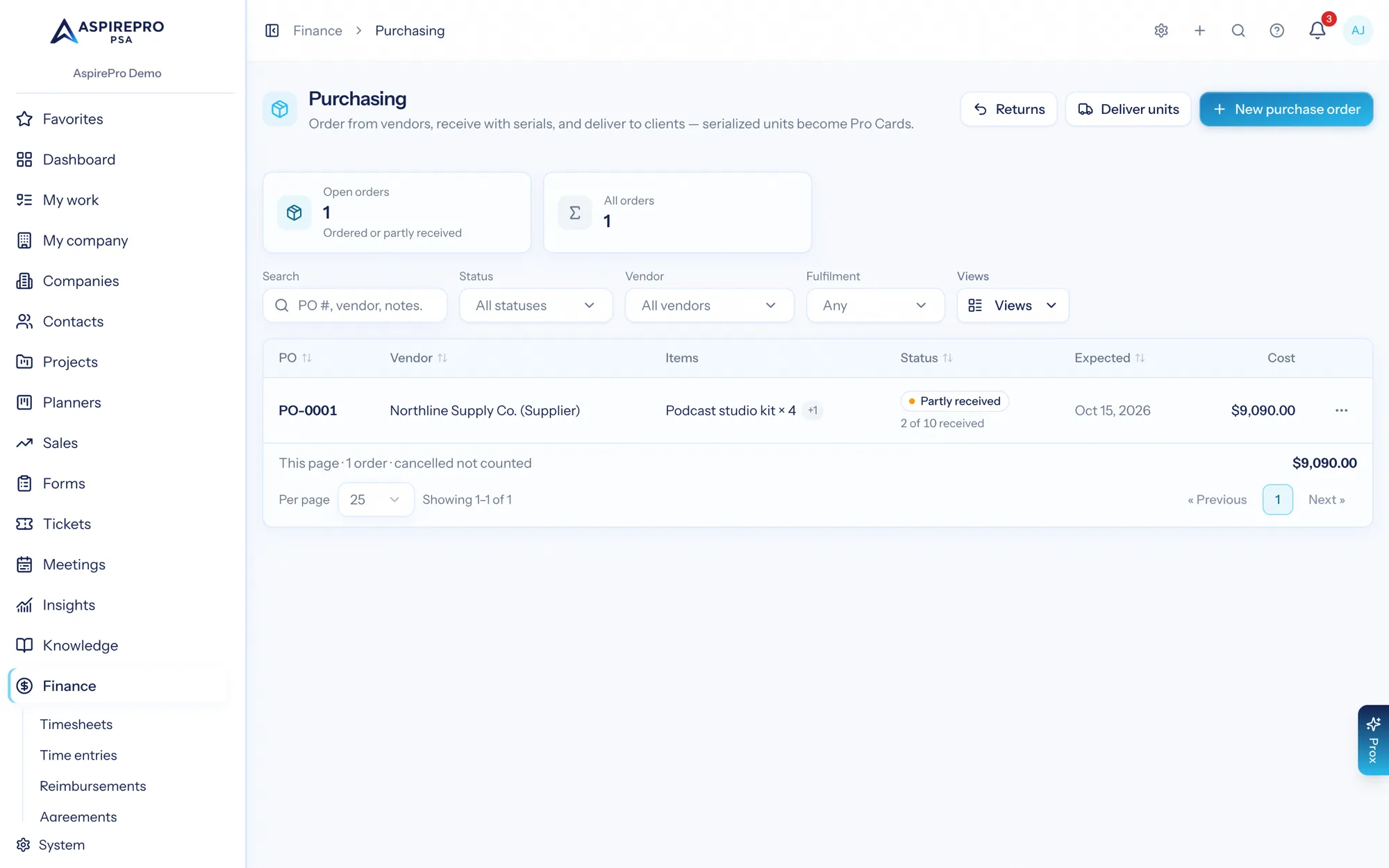
The Purchasing page (behind the Inventory & Purchasing module toggle) holds simple purchase orders: pick a vendor, add items (costs default from the catalog), and receive as boxes arrive — partial receipts move the order from ordered to partial to received, and every receipt books a stock ledger row referenced back to its PO line. Serialized items require one serial number per unit at goods-in — that's what makes the next part possible.
Drop-ship orders flip one switch and pick the client: receiving then skips stock entirely, because the box never touched your shelf. Serialized drop-ship units become Pro Cards on that client immediately.
Delivering from stock works the same way: pick in-stock serialized units and the client, and each unit becomes a Pro Card there — built from the item's Pro Card template, serial number pre-filled in both the card title and the template's serial field. Stock drops once, the unit remembers its card, and a year later the serial is right on the client's record when they call about it.
Vendor returns (RMA)#
When a unit fails, open an RMA from the Purchasing page: pick the unit (delivered or on the shelf), the vendor it goes back to, and paste the vendor's RMA number from their portal. Mark it sent when the box ships, then close it with the honest ending: replaced swaps the new serial onto the unit and its Pro Card (title and serial field — the client's record follows the physical device); refunded either restocks the unit (+1 in the ledger, Pro Card deactivated) or writes it off; declined records the vendor's answer and changes nothing else. Deliberately not built: vendor credit accounting and loaner tracking — the ticket and this record cover the small-shop workflow.
Unmapped agreement lines#
Agreement line items and named service rates written as free text (typed without picking an item, or from before the catalog existed) show on the Unmapped lines tab, grouped by name. Until a line points at a catalog item it counts as unknown — not absent — so client coverage stays honest rather than inventing gaps that may already be sold.
Exact name matches are suggested, never auto-applied: whether "Managed Backup" and "Backup Management" are the same offering is your call, because every coverage number downstream inherits the answer. Map a name to any item in the catalog (the picker searches all of it), or — when no item has that name yet — create the item from the name in one click. If an item with the same name already exists, even an inactive one, AspirePro asks you to map to it rather than create a duplicate.
Coverage and the estimated annual value#
Services sold (on each company's Lifecycle tab, the Lifecycle worklist, and the Services Sold by Client metric) is measured against the service side of the catalog: what share of your active services each client buys, counting only agreements in force today. Hardware items don't count — nobody sells one of every laptop to every client. See Lifecycle.
Each service can carry an estimated annual value used to size the growth pipeline. It's a list-price estimate, never booked revenue, and every surface that shows it says so. Leave it blank on a service with a recurring price and AspirePro derives it from the recurring price (a $750/month service is a $9,000/year opportunity).
Permissions#
- View Catalog lets someone see items when pricing work. Managers and users have it by default.
- Manage Catalog adds create/edit/delete and exposes cost and margin. Managers have it by default; anyone who holds Manage lifecycle keeps catalog access automatically, from when the catalog lived under Lifecycle.
- Purchasing & Inventory (
catalog.purchasing.manage) covers the whole Purchasing page — POs, receiving, deliveries, stock, and RMAs — without the ability to edit the price list, so a coordinator can receive deliveries and hand over hardware without repricing anything. Vendor costs on POs are visible (they're inherent to receiving); sell prices and margins are not editable. Manage Catalog implies it.
Every change is written to the audit log, and Prox can author the catalog with the same guards through the manage_catalog_item tool.