A project template is the shape of a kind of work you do again and again: a website build, an onboarding, a quarterly review. You build and edit it on the same pages as a project, and nothing on it is live work. When you start a project from it, its days become dates and its roles become people.
Where templates live#
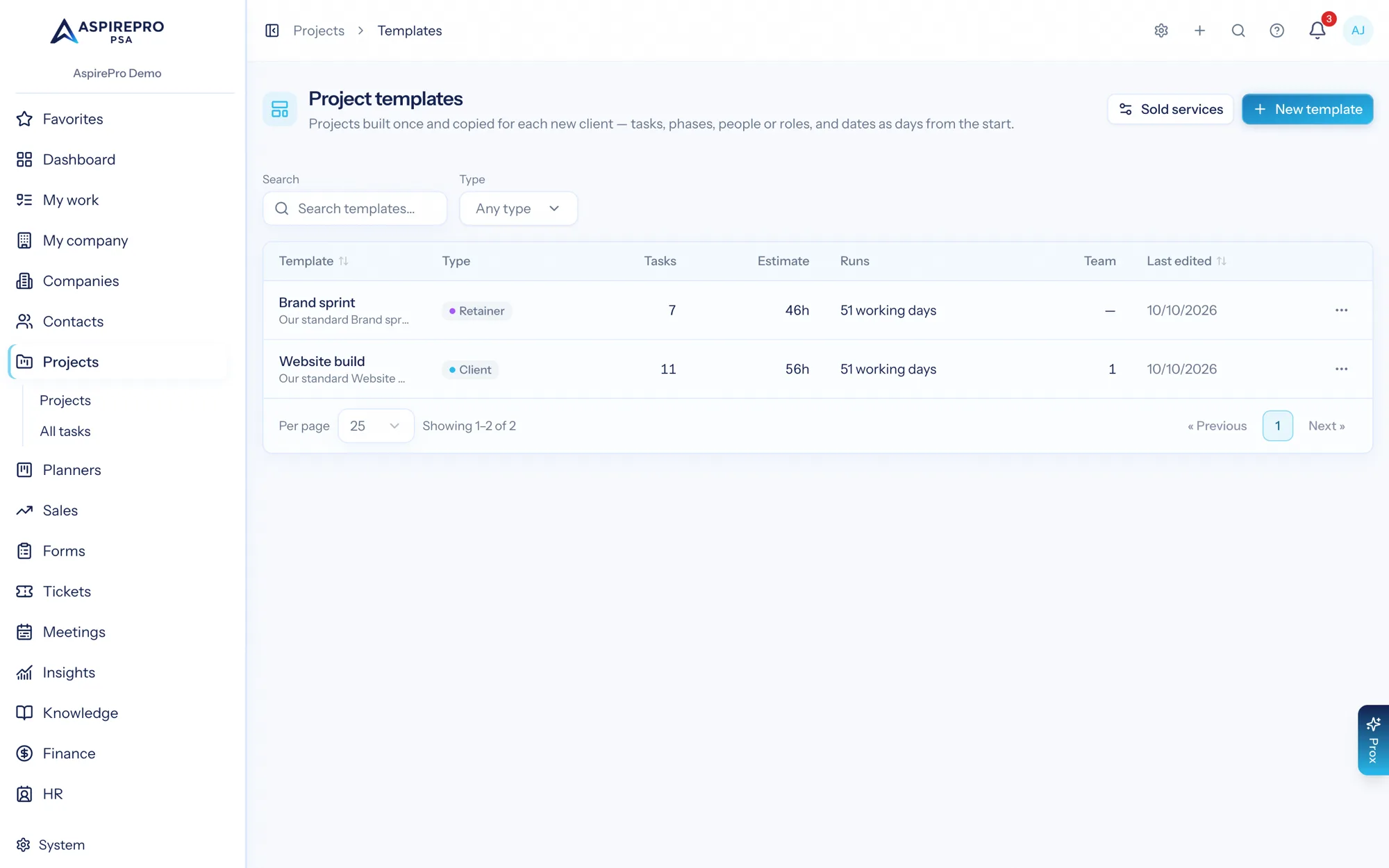
Open Projects and choose Templates (or go to Projects → Templates). The list shows each template's type, number of tasks, estimate, how long it Runs (in days), team size, and when it was last edited. Search by name or filter by type.
- New template makes an empty template and opens its board.
- Save as template on a project (in its Actions menu) copies that project into a new template.
- Duplicate template on a template makes a copy to change.
Making and editing templates needs the Project settings permission. Anyone who can create projects sees the list and can use the templates.
Building a template#
A template opens with a banner that says This is a template. It has the Overview, Tasks, Rates & pay and Audit trail tabs. There's no time, files, tickets or resourcing on a template, because nothing on it is real work.
- Lanes and tasks work as on a project: add, move, tag, give checklists, subtasks, dependencies, estimates and phases.
- Dates are days. A task starts on Day 1, Day 5 and so on, counted from the project's start. Day 1 is the start date itself.
- Template settings (in the template's Actions menu) holds its name, description, project type, estimate, length in days, Skip weekends, and the Billable and Require logged time to complete tasks switches a new project starts with.
- Skip weekends counts days in working days, Monday to Friday. Holidays aren't skipped.
- Assign a person or a role. A task can go to a named person or to a work role, such as Designer. Nobody is notified and nothing lands in anyone's work while it's a template.
- Team. The Team card on the overview lists the people or roles who join every project made from the template, each with the project role they'll get (Viewer, Editor or Admin). Being on a template's team gives no access to the template itself.
- Phases use Day N too, and always start as upcoming on a new project.
- Repeating tasks are stored switched off, starting from a Day N. They switch on in each project made from the template.
- Rates set on the template carry into each project made from it.
- Pro Cards. The Pro Cards card on the Overview lists the Pro Card types the template creates (for example a "Pen test scope" with systems, addresses and access). Each project made from the template gets those cards on its company, filled with the type's default values. Secret fields, such as passwords, always start blank. A project with no company gets no cards; the confirmation names them so you can add them once the company is set.
- Estimates. A new project with no estimate of its own takes the total of its tasks' estimates.
You can't complete tasks, log time, or assign real work on a template. Bulk actions on a template's board move, tag and delete tasks only.
Starting a project from a template#
Choose New project, then From a template, and pick one, or choose Use this template on the template itself.
- Pick the start date. Every Day N becomes a date counted from it, and the project's due date comes from the template's length. With no start date, Day 1 is today.
- Under Who does what, pick a person for each role the template uses. When only one person holds a role, they're already picked. Leave unassigned leaves that role's tasks with nobody on them.
- Create the project. The confirmation says how many tasks were left unassigned and for which role.
The dialog's Billable and Require logged time to complete tasks switches start where the template has them. What you type or switch in the dialog wins over the template, for example the description, type or billing switches. The new project remembers which template it came from.
Projects from sold services#
A product or service in the catalog can start a project template: set Starts a project on its catalog item. When a deal that sold several of them is won (or a quote is accepted), the Create a project from a template automation action can make the projects from what was sold. Projects → Templates → Sold services chooses whether that makes one project per service or one project with a phase per service. See Workflows & automations for the step.
Through Prox and connected assistants#
list_recordswith typeproject_templatelists templates, andget_recordreads one.create_projecttakes atemplate_id, astart_dateandrole_assignments(who fills each work role). A role nobody was picked for goes to its only active holder, or stays unassigned, and the result names it.save_project_as_templatesaves a project as a new template.
Templates can't be edited through Prox yet. Open them in the app.
Old templates#
Templates made before October 2026 were copied into this new kind automatically. Old links to Projects → Settings → Templates now open the Templates list.
How estimates compare with what tasks really took#
Every task copied from a template remembers which template task it came from, even through later duplicates. The Task estimate vs actual dashboard widget uses that to show how long each template task really takes on average against its estimate, so you can see which template estimates to change. Projects made before October 2026 don't carry that link, so their tasks are grouped by name instead.