A planner is a board: buckets (columns) of task cards you arrange to fit however you work. The board and the task panel are exactly the ones described in The task engine — this page covers what's specific to planners.
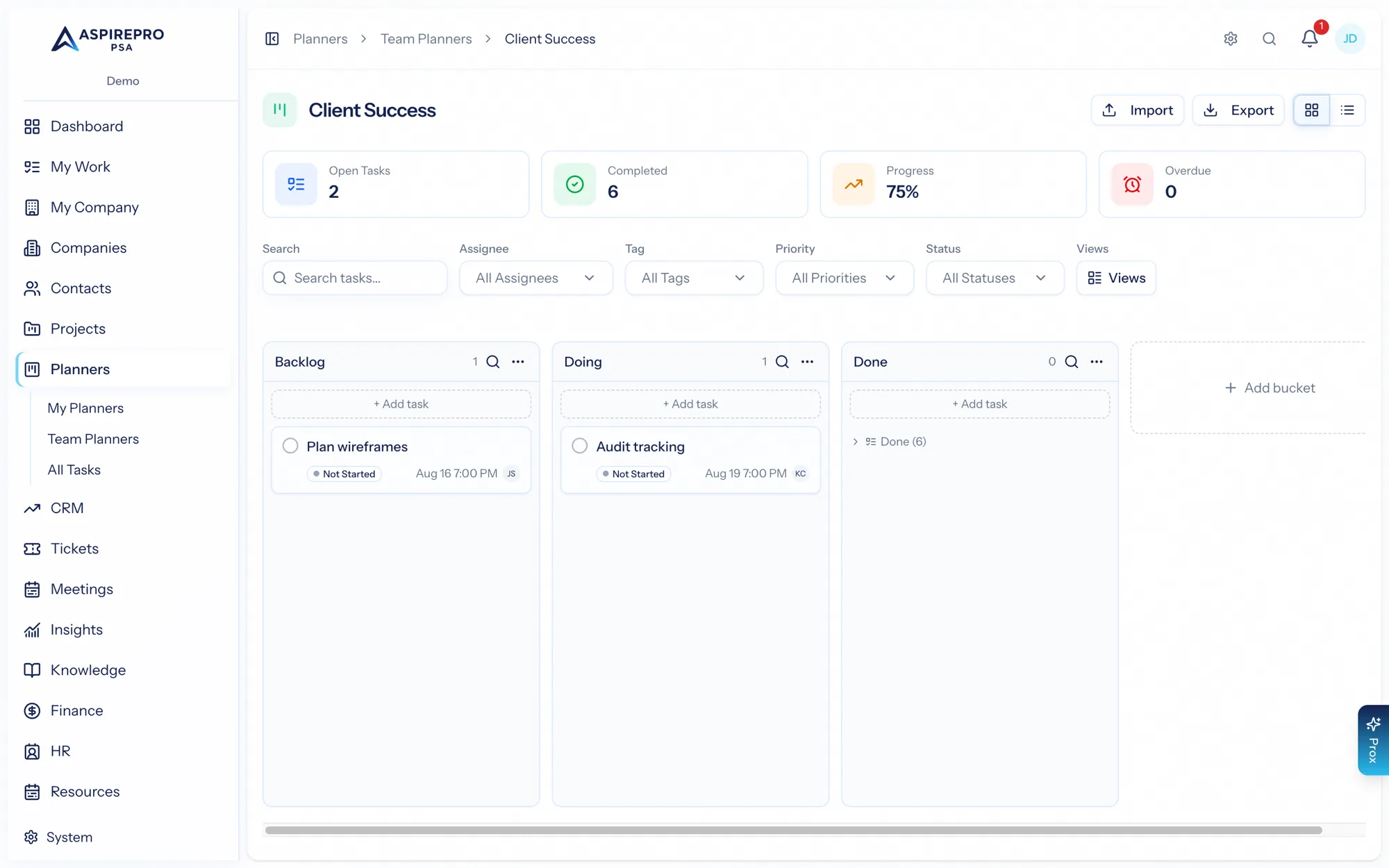
Buckets and cards#
Create buckets for your columns — stages, categories, priorities, days of the week, whatever suits the board — and add task cards to them. Drag cards between buckets, switch between board and list views, group by bucket/status/priority, search, and filter. Save views for the ways you like to look at the board.
The task panel#
Every task opens the same rich task panel as projects, with:
- Details — status, priority, dates, assignees, tags, progress.
- Checklist, Comments, Files, and Links.
- Subtasks and dependencies.
- Review workflow, recurrence, and Markdown import.
See The task engine for the full walkthrough — it all works identically here.
Quick planning#
Planners are built for speed: quick-add a task, move it, complete or reopen it, and reorganize buckets freely. There's no project overhead — no budget, no phases, no client — so a planner is the fastest way to get a board going.
What planners don't have#
Because planners are for internal, flexible work, they deliberately leave out the client-facing pieces of projects — there's no client-portal sharing on a planner. If you need to share work with a client, use a project instead. See Projects vs. Planners.