AspirePro's own recorder isn't the only way meetings get in. If your team already runs Fireflies — or any notetaker that can export a transcript — those meetings can live in AspirePro too, where they become searchable, linkable to clients, and a source of real tasks and tickets.
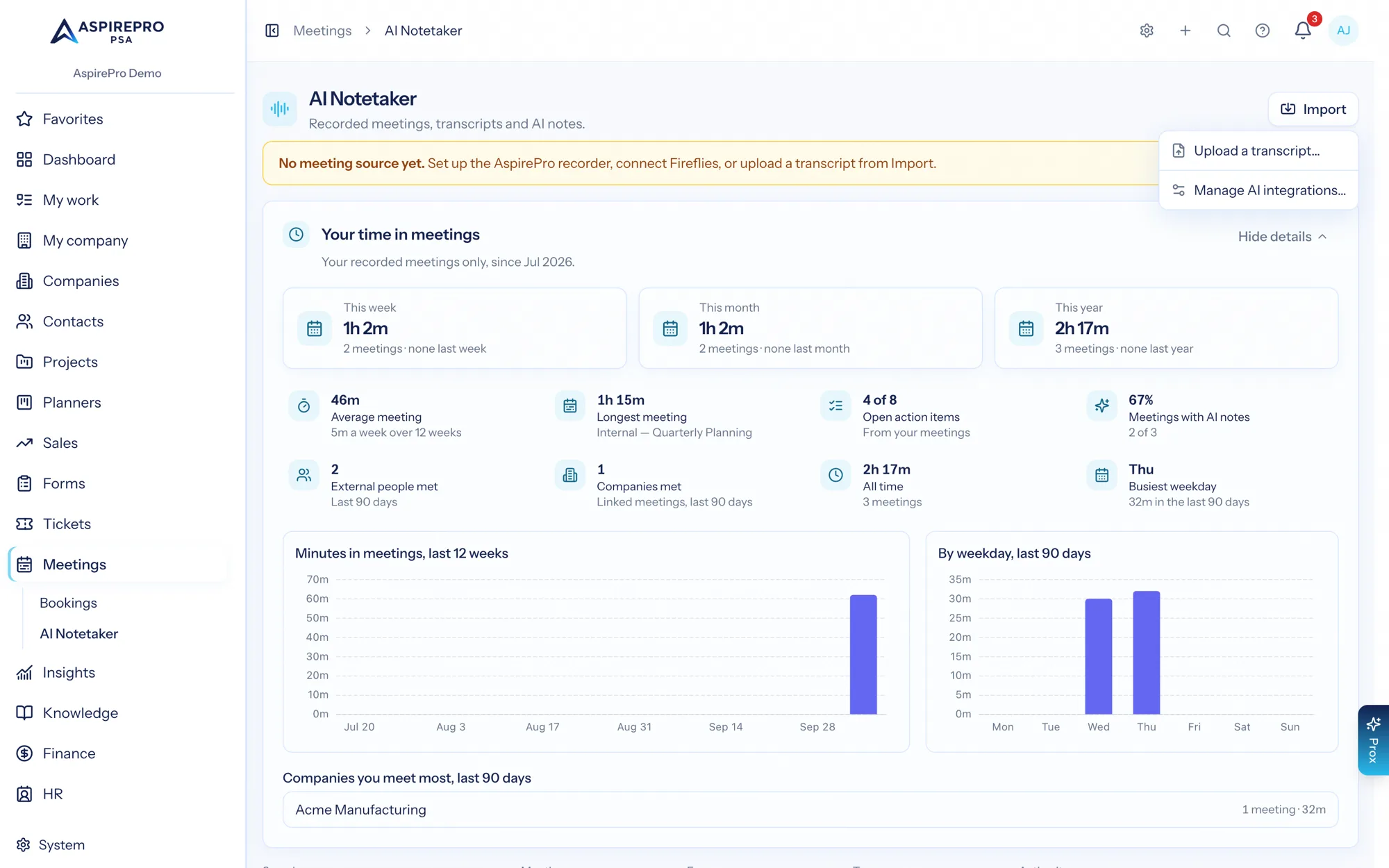
Imported meetings behave exactly like recorded ones: they belong to whoever imported them (the same no-admin-override privacy model), the default sharing rule applies, transcripts are stored in AspirePro permanently, and action items can be sent to My work, a planner, or a ticket.
Fireflies#
Connect your Fireflies account from Account settings → Integrations (or the AI Notetaker → Import shortcut) with your personal API key (in Fireflies under Integrations → Fireflies API). From then on:
- New Fireflies meetings import automatically (checked hourly — a deliberate cadence, since Fireflies' Free plan allows 50 API requests a day), or on demand with Sync Fireflies now. If your plan's API limit is ever reached, the connection pauses politely and resumes on its own — the card says so, and nothing is lost.
- Each meeting arrives with its transcript (speaker-attributed and timestamped), Fireflies' own summary and key points, and its action items — parsed into real, assignable action items that can become tasks and tickets.
- The summary is labeled from Fireflies. Prefer AspirePro's AI? Flip the Meeting notes setting on the connection to Generate with AspirePro AI (Prox) — new imports then skip Fireflies' notes and Prox writes them from the transcript. (Historical backfills stay pending either way; generate notes on any meeting with one click. And Regenerate notes always works per meeting.)
- Nothing is ever changed or deleted on the Fireflies side — the connection is read-only, and deleting a meeting in AspirePro never touches your Fireflies library.
Connections are personal: your API key imports your meetings, owned by you. Each teammate connects their own. An administrator governs which personal integrations are available to the team under System → Integrations — turning one off pauses everyone's syncing without touching already-imported meetings.
Fathom and Read.ai#
These notetakers push each finished meeting to AspirePro. Connect from Account settings → Integrations: one click mints a personal webhook URL — paste it into the provider's webhook settings, and meetings arrive as they finish, transcript and notes included. The URL is the credential (treat it like a password; disconnecting revokes it), and everything downstream — search, action items becoming tasks and tickets, sharing, client timelines, the notes-source choice — works exactly like Fireflies imports.
Any tool that can send a webhook#
The Custom webhook connection accepts a simple JSON shape from anything that can POST when a meeting ends (an automation platform, a script, an in-house tool):
{
    "id": "optional-stable-id",
    "title": "Kickoff with Acme",
    "started_at": "2026-08-21T15:00:00Z",
    "duration_minutes": 30,
    "attendees": [{ "name": "Ada Acme", "email": "ada@acme.com" }],
    "transcript": [
        { "speaker": "Josh", "text": "Welcome everyone.", "start_seconds": 0 }
    ],
    "summary": "Optional — omit it and generate AspirePro AI notes instead.",
    "key_points": ["Optional bullets"],
    "action_items": ["Optional follow-ups"]
}
Every field except a title or transcript is optional; replays of the same id are ignored, and a payload with nothing usable is acknowledged and skipped — never invented into a meeting.
Any other notetaker (including Otter)#
Otter has no public API, and plenty of tools are in the same boat — so the universal lane is a file: AI Notetaker → Import → Upload a transcript. Supported formats:
- .vtt / .srt — subtitle-style transcripts with timestamps (and speakers, when tagged).
- .txt — plain text with
Speaker: what they saidlines, which is exactly what Otter's text export produces.
Give the meeting a title and date, and it imports as a fully searchable meeting. Since files carry no notes, the summary starts empty — generate AspirePro AI notes from the meeting page and the action items are extracted for you.
Running Fireflies alongside the AspirePro recorder#
Both can be connected at once — the Upcoming tab and join toggles keep working for the AspirePro recorder, and Fireflies imports arrive beside them with a provider badge. When both sat in the same call, AspirePro keeps one meeting, not two — and you pick whose capture fills it: the Fireflies connection dialog offers a capture winner choice (shown only when both sources are connected). The default keeps the AspirePro recorder's transcript and AI notes (it has the audio); choosing Fireflies replaces the transcript, notes, and open action items on that same meeting record with Fireflies' versions — the audio recording stays either way. Different meetings in the same time slot always both come through.
What's different about imported meetings#
AspirePro hides what an import can't do rather than showing dead controls:
- No recording player — the audio stays with your provider; the transcript is what imports.
- No Upcoming tab or join toggles — those belong to the AspirePro recorder, which sees your calendar. Fireflies manages its own joining in Fireflies.
- Everything else — search, sharing, PDF export, deal linking, action items → work — is identical.